
Participant
September 20, 2024
Question

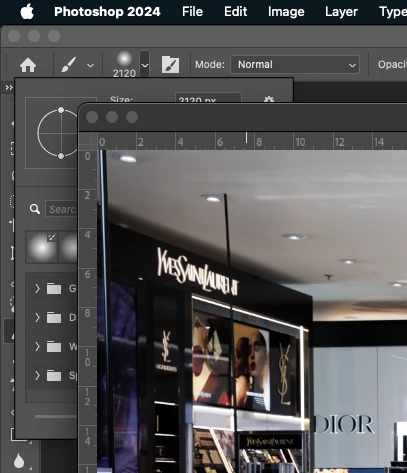
The size selector of the Photohop tool remains below the image and cannot be adjusted without moving

  • September 20, 2024
  • 2 replies
  • 186 views

The size selector of the Photohop tool remains below the image and cannot be adjusted without moving the image away. It wasn't like this before, the size selector came over the picture. Can this be adjusted/changed?
This topic has been closed for replies.

2 replies

Ged_Traynor
Community Expert
Community Expert
September 21, 2024
johng44721896
Community Expert
Community Expert
September 21, 2024

When we have our canvas in a floating window, we can either drag the window away from the panel that descends when we click the disclosure triangle of the brush in the options bar, or as in my screen shot, choose Window > Arrange, and click on Consolidate All to Tabs. When we have our canvas in tabs, the drop-down panel from the options bar will be in front of the canvas.