
sangyi
Participant
March 3, 2020
Question

The white in my photoshop turns yellow
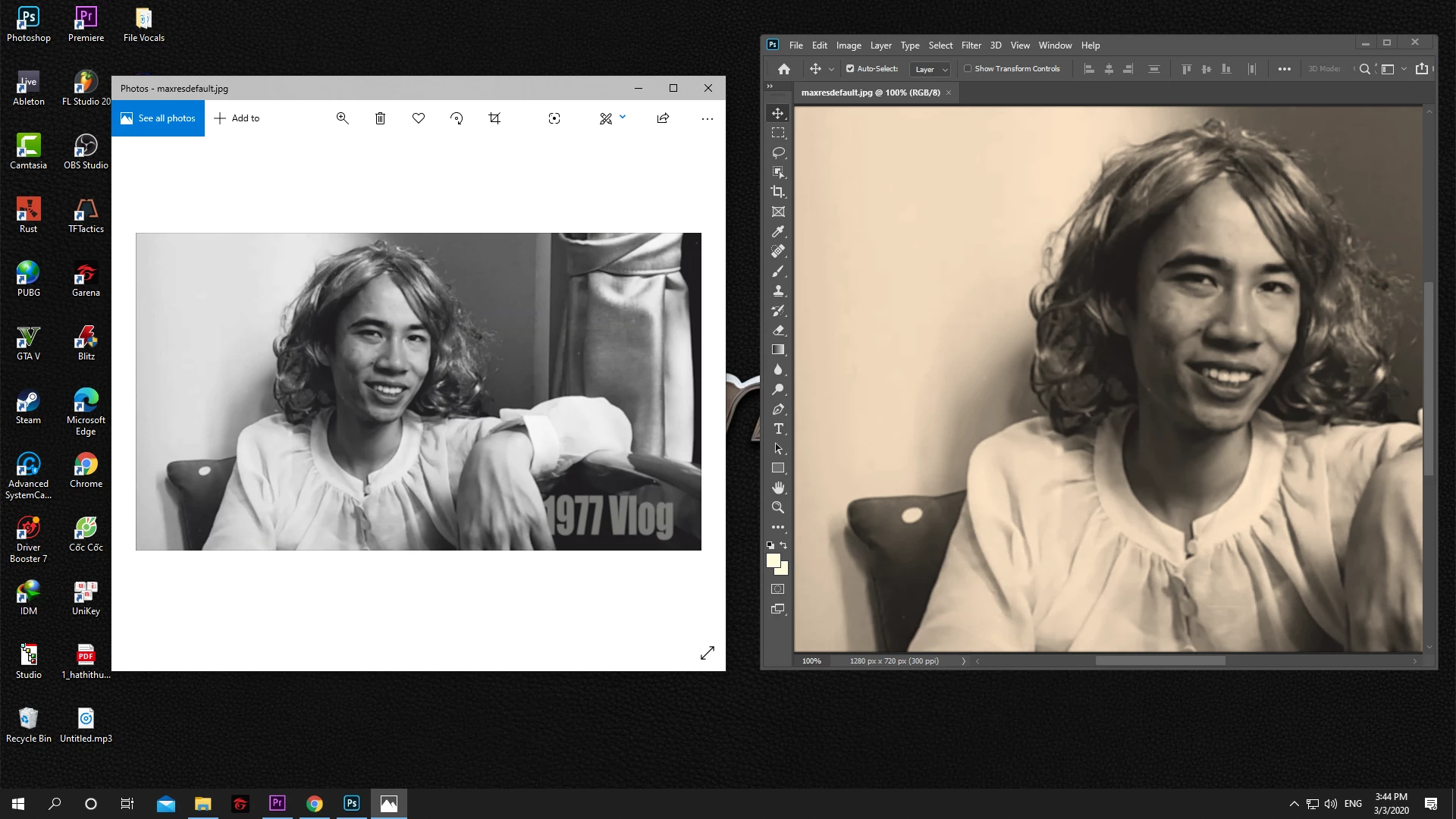
  • March 3, 2020
  • 3 replies
  • 910 views

My white color has completely disappeared, instead there is only pale yellow. Please help me fix this problem, thank you

This topic has been closed for replies.

3 replies

NB, colourmanagement
Community Expert
Community Expert
March 4, 2020

At least once a week on this forum we read about this, or very similar issues.

Unfortunately, with Microsoft hardware: Windows updates, Graphics Card updates and Display manufacturers have a frustratingly growing reputation for installing useless (corrupted) monitor display profiles.

I CAN happen with Macs but with far less likelyhood, it seems.


The issue can affect different applications in different ways, some not at all, some very badly.


The poor monitor display profile issue is hidden by some applications, specifically those that do not use colour management, such as Microsoft Windows "Photos".


Photoshop is right, it’s the industry standard, it's revealing an issue with the Monitor Display profile, whatever you do, don't ignore it. 


To find out if this is the issue, I recommend you to try setting the monitor profile to sRGB in the control panel.

(OR if you have a wide gamut monitor display try Adobe RGB instead).

Quit and relaunch Photoshop after the change to ensure the new settings are applied.


If this fixes the issue, it is recommended you calibrate and profile the monitor properly using a calibration sensor like i1display, which will create and install it's own custom monitor profile.

Depending on the characteristics of your monitor and your requirements, sRGB or Adobe RGB may be good enough but custom calibration is a superior approach.


I hope this helps

if so, please "like" my reply and if you're OK now, please mark it as "correct", so that others who have similar issues can see the solution

thanks

neil barstow, colourmanagement.net :: adobe forum volunteer

[please do not use the reply button on a message in the thread, only use the one at the top of the page, to maintain chronological order]

D Fosse
Community Expert
Community Expert
March 3, 2020

That's a broken/defective monitor profile. Windows "Photos" is not color managed, does not use the profile, and is unaffected.


Unless you fixed this by using a calibrator to make a new monitor profile, you haven't fixed it at all. You've just, at best, managed to hide it by disabling color management completely. Setting the working RGB to Monitor Color, for instance, will do that.


Don't change anything in Photoshop Color Settings! That's not where the problem is.


If you don't have a calibrator it's better to set up sRGB IEC61966-2.1 as default profile. It won't be accurate, but better than a broken profile. Relaunch Photoshop when done, it needs to load the new profile at application startup:

sangyi
sangyiAuthor
Participant
March 3, 2020

I fixed it

NB, colourmanagement
Community Expert
Community Expert
March 4, 2020

Please tell us how you "fixed it". You may have masked the issue and that could lead to problems later. 


thanks

neil barstow, colourmanagement.net :: adobe forum volunteer

[please do not use the reply button on a message in the thread, only use the one at the top of the page, to maintain chronological order]