
Participating Frequently
July 9, 2018
Question

This document contains unknown data which will be discarded to keep layers editable CC 2018

Hey, I'm getting an error when I open a particular psd in CC 2018, stating
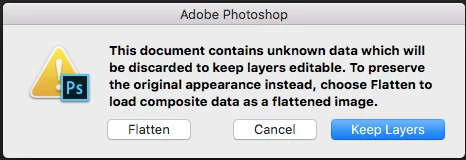
If I click keep layers, photoshop loads the file, but still flattens it anyways. I've tried to open the file on Windows 10 and MacOS, and in CC 2018 and CC 2014, with no avail. Since the file was saved on a usb, I can't seem to use Window's previous version to try to recover the file that way. I used a file recovery program to recover a previous version of the file, but unfortunately cannot open it, getting the error " Could not complete your request because it is not a valid Photoshop document." I've also tried resetting photoshop preferences and reinstalling Photoshop CC 2018, but no hope there either. The file is decently large, being 1.66 gb, however another psd I was working on at the same time and in the same session, which is also around the same size, received the error when being opened, yet it was able to actually keep it's layers. As the work was for a customer with a due date, would suck if I would have to redo the artwork for the file, so I'm willing to try any suggestions the adobe community may have!

Thanks

    Ce sujet a été fermé aux réponses.

    2 commentaires

    c.pfaffenbichler
    Community Expert
    Community Expert
    July 10, 2018

    Can you provide the file for testing?

    Did the composition include Smart Objects, if so which kinds?

    But personally I suspect it may actually be damaged.

    Participating Frequently
    July 11, 2018

    Here's a link to the file in question: Dropbox - Untitled-2.psd

    Only smart objects I used are 6 colored boxes with rounded corners and a blending mode stroke applied on it. Unfortunately, yeah I guess the file is damaged too, but would still like to see if I can recover anything

    c.pfaffenbichler
    Community Expert
    Community Expert
    July 11, 2018

    Thanks, unfortunately I get the same result (file opens flattened despite »Keep Layers«).

    Is this the only affected file?

    If not you might file a report over at

    Photoshop Family Customer Community

    Otherwise you could try one of the tools for recovering damaged Photoshop files, but I am not optimistic.

    Sahil.Chawla,the file fails to open with Layers on Photoshop 19.1.5, too.

    Sahil.Chawla
    Adobe Employee
    Adobe Employee
    July 10, 2018

    Hi Coolspyguy,

    We're sorry to hear about the unknown data error, this error lets you know that the version of Photoshop the designer has is more advanced than yours. For this matter, some features included in the designer’s version are not recognized by yours. This can be exemplified by 3D layers or Smart Filters. You can try updating to the most recent build of Photoshop which is 19.1.5

    Regards,
    Sahil

    Participating Frequently
    July 11, 2018

    I am the designer and I opened the file in the same version of Photoshop, so that shouldn't be what's causing the problem. Any other reasons why this problem might happen? Would love to narrow it down.