Participant
January 17, 2017
Answered

This is regarding the refine edge tool

  • January 17, 2017
  • 3 replies
  • 424 views

Tbh it took me hours and i still cant get it figured out.

So i have created a pentagon shape via PS.

and have then created a border around it..

however it has some rigged edges so i try to use the refine edge tool (select and mask tool) to smooth it out.

what happens is that the refine edge tool smooths out my selection box instead of my actual image...

help pls..
    This topic has been closed for replies.
    Correct answer c.pfaffenbichler

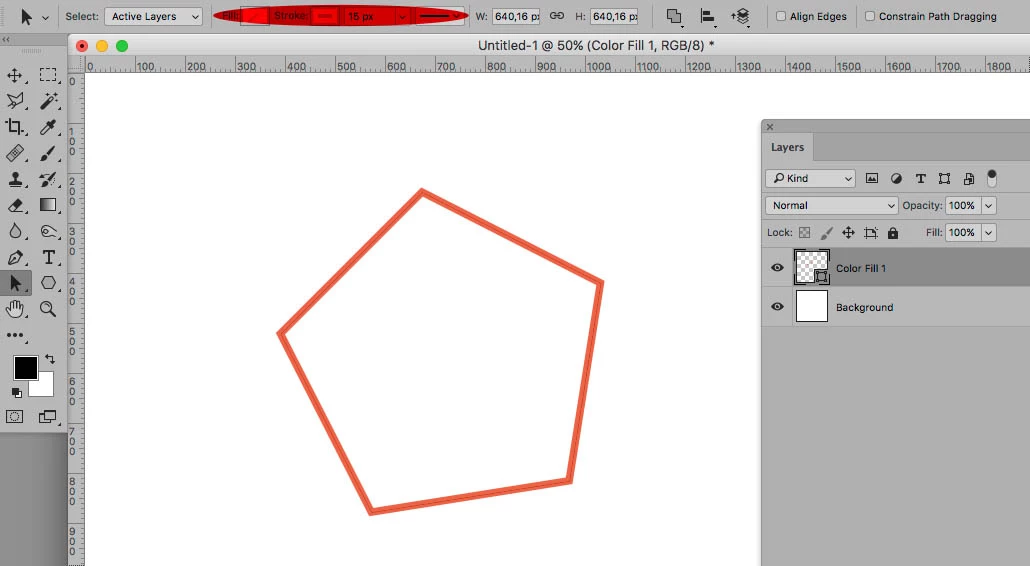
    With a Shape Layer you can maintain an editable Stroke.

    3 replies

    davescm
    Community Expert
    Community Expert
    January 17, 2017

    Refine edge is for modifying the edges of selections. It is particularly useful where those edges contain fur of fine hair. It is not for smoothing our vectors.

    If you use the shape tool and stroke the edge (as shown above by c.pfaffenbichler  ) you will get the smoothest stroke which will display at your chosen pixel resolution. Because a shape is a vector, scaling will not reduce the resolution.

    However, as with any image being displayed, if you zoom in greater than 100% you will start to see the pixels. This is unavoidable as the shape cannot be displayed at a higher resolution than your canvas.

    Zoom in :

    However - because this is a vector based shape - if I increase the Image size by 400% and then zoom out again to display it at 100% - I get smooth edges again

    Dave

    c.pfaffenbichler
    Community Expert
    c.pfaffenbichlerCommunity ExpertCorrect answer
    Community Expert
    January 17, 2017

    With a Shape Layer you can maintain an editable Stroke.

    c.pfaffenbichler
    Community Expert
    Community Expert
    January 17, 2017

    How did you create the pentagon?

    Could you please post a screenshot taken at View > 100% and with the pertinent Panels (Paths, Channels, Options Bar, …) visible?