urif81649969
Participant
July 3, 2018
Question

This message keeps popping up

  • July 3, 2018
  • 1 reply
  • 324 views

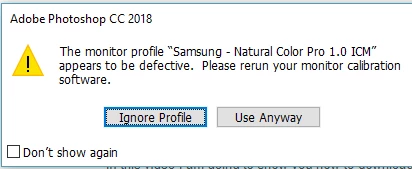
For a week now i have been using photoshop cc and every time i open the app, this message pops up and i hit ignore profile. what does it mean?

This topic has been closed for replies.

1 reply

Per Berntsen
Community Expert
Community Expert
July 3, 2018

It means exactly what it says - you have a defective monitor profile. Samsung and other monitor manufacturers are known to make low quality, or even defective profiles, and these profiles are typically installed with Windows 10 updates.

Photoshop relies on a sound and correct monitor profile to display images correctly, and the best way to achieve this is to calibrate the monitor with a hardware calibrator, which will also create a new and accurate monitor profile.

If you don't have a calibrator, you can set the monitor profile to sRGB (use Adobe RGB if you have a wide gamut monitor).

This may be close enough, but for maximum accuracy you should use a calibrator.

To set the monitor profile to sRGB, go to Control panel > Color management, add the sRGB profile and set it as default.

Make sure Use my settings for this device is checked.