Participant
June 16, 2021
Answered

Thumbnail image preview unavailable in layers panel for Photoshop 2021

  • June 16, 2021
  • 1 reply
  • 2478 views

When using Photoshop, I was able to see a preview of the image along with anything I masked out too. For some reason it just shows a brush which would be the image I am fixing/retouching. Along with any masking, it does not show what I have masked too. Not sure if it's because its a new update or if there is something I can change in the settings. Thank you for the help in advance 🙂 


{Thread title edited by moderator}
This topic has been closed for replies.
Correct answer nikunj.m

Hi,


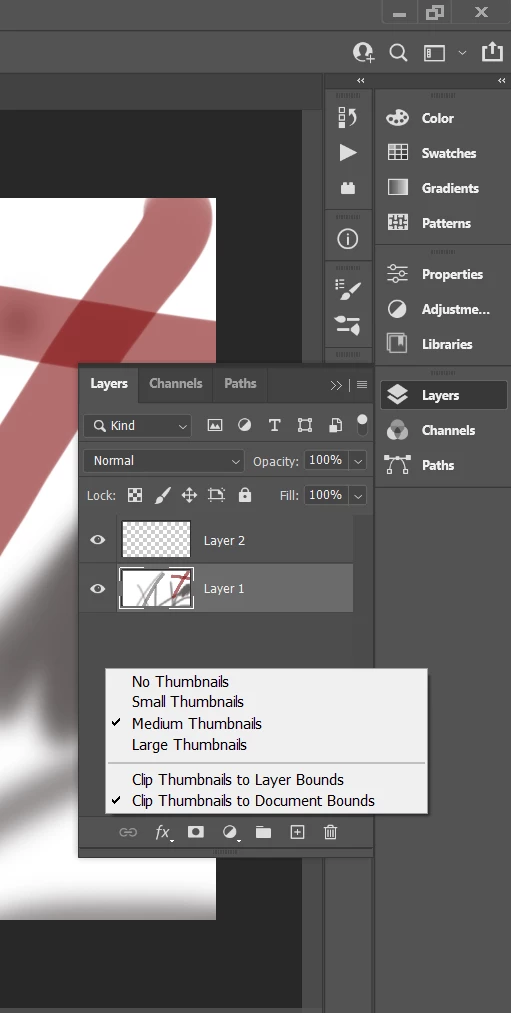
We're sorry about the trouble with Photoshop due to the thumbnails in the Layers panel. Please try Right clicking on the empty space in the Layers panel & check if the thumbnails are set to No Thumbnails. If it is, change that to small, medium or large thumbnails as per your requirement.


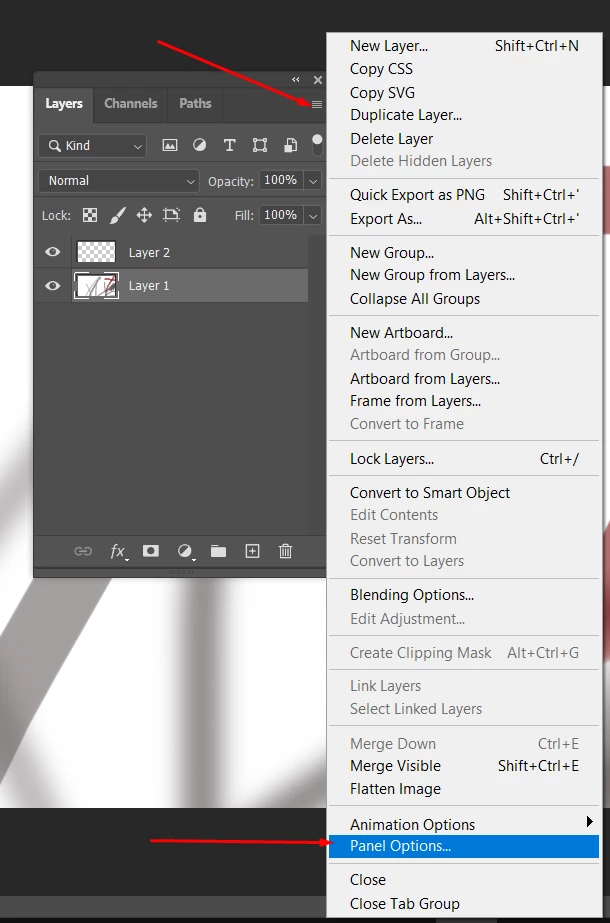
You can also click on the menu icon at the top right of the Layers Panel & select the option for Panel options from the menu to change/set the thumbnail size.


Let us know if this helps!

Regards,

Nikunj

1 reply

nikunj.m
nikunj.mCorrect answer
Legend
June 18, 2021

Hi,


We're sorry about the trouble with Photoshop due to the thumbnails in the Layers panel. Please try Right clicking on the empty space in the Layers panel & check if the thumbnails are set to No Thumbnails. If it is, change that to small, medium or large thumbnails as per your requirement.


You can also click on the menu icon at the top right of the Layers Panel & select the option for Panel options from the menu to change/set the thumbnail size.


Let us know if this helps!

Regards,

Nikunj