Participating Frequently
December 7, 2016
Answered

Tiff to Xmp

  • December 7, 2016
  • 4 replies
  • 1394 views

Why is it that when I export my finished photos from photoshop in Tiff, they convert automatically to Xmp files that cant be opened?

    This topic has been closed for replies.
    Correct answer Chuck Uebele

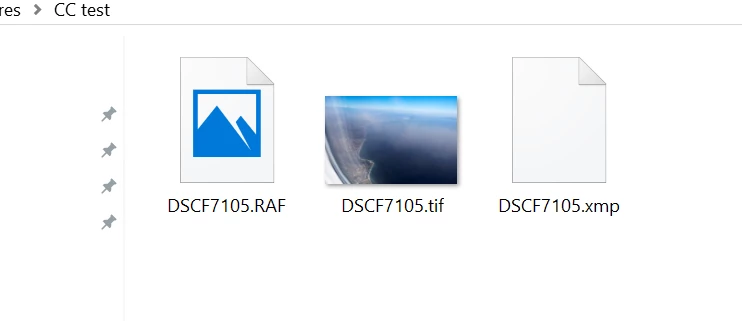
    I'm not sure what you mean by export to original file, unless that's though Lightroom.  If you make a correction in Camera Raw, it will create an XMP file with the same name as your raw file, that's normal, and that file contains all the corrections Camera Raw did to that file. If you delete it, it will delete all the corrections to the original raw file but it will not delete the original raw file. I opened a raw file (.raf) in ACR, made some corrections, opened it in PS, did a slight corrections, and saved it as a tiff. This is what I get in that folder:
    4 replies

    Chuck Uebele
    Community Expert
    Chuck UebeleCommunity ExpertCorrect answer
    Community Expert
    December 7, 2016

    I'm not sure what you mean by export to original file, unless that's though Lightroom.  If you make a correction in Camera Raw, it will create an XMP file with the same name as your raw file, that's normal, and that file contains all the corrections Camera Raw did to that file. If you delete it, it will delete all the corrections to the original raw file but it will not delete the original raw file. I opened a raw file (.raf) in ACR, made some corrections, opened it in PS, did a slight corrections, and saved it as a tiff. This is what I get in that folder:

    shaun61Author
    Participating Frequently
    December 7, 2016

    Thanks, think I get it now ?

    Shaun

    Sent from my iPhone

    Chuck Uebele
    Community Expert
    Community Expert
    December 7, 2016

    Can you describe how you're finishing your photos? Do you mean correcting them in camera raw? Are the tiffs there or just xmps? Xthe xmp format is just for the metadata for correcting an image, it isn't the actual image. It's just used to apply the correcting made in Camera Raw. So you should have the tiffs.

    shaun61Author
    Participating Frequently
    December 7, 2016

    Hi Chuck,

    I open them in Camera raw, click into PS,work on them in PS, save as tiff, export to original file. xmp file opens next to cr2 file, copied worked on file nowhere to be seen. Have uninstalled lightroom, changed save preferences to tiff, still have xmp files next to raw files.

    Thank you

    Shaun

    richardr60688771
    Participant
    December 7, 2016

    When using Adobe is the market cloud separate

    Sent from my iPhone

    shaun61Author
    Participating Frequently
    December 7, 2016

    This still hasn't answered my question!!

    Sent from my iPhone

    shaun61Author
    Participating Frequently
    December 7, 2016

    that is not very helpfull !!!

    shaun61Author
    Participating Frequently
    December 7, 2016

    Is this as good as Adobe help gets?