Inspiring
October 28, 2022
Answered

to make shadow of the car . I used ctrl+T on new layer and selected vertical but it's not working

  • October 28, 2022
  • 2 replies
  • 1288 views

hello,

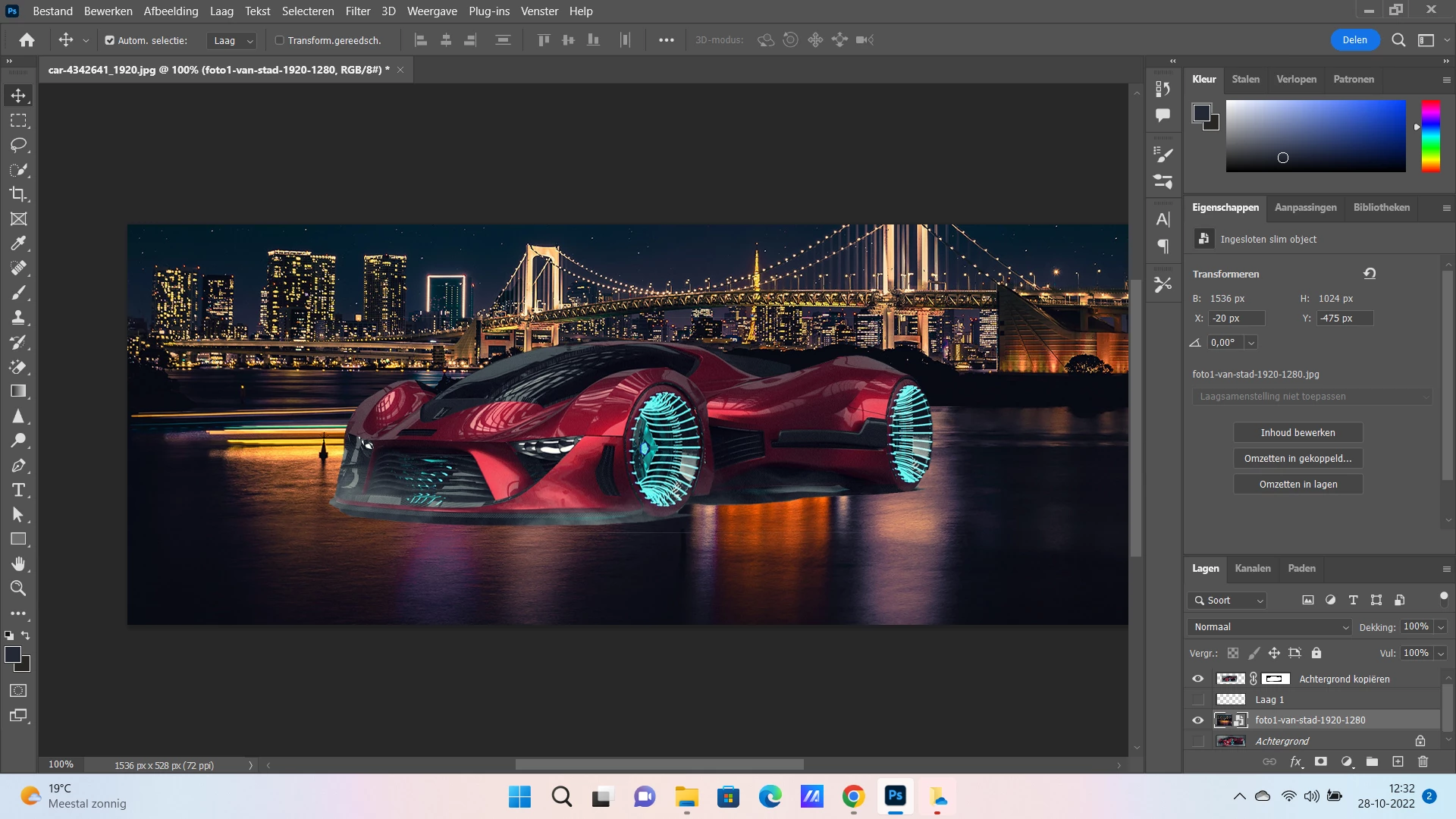
I want to make vertical image of the car to make shadow of the car .(2 cars one is horizontal the other vertical)

first I selected the car and made a copy of it . then  I used ctrl+T on the copy layer and  I choose vertical to make second image of the car but I get only the vertical one not the horizontal .the horizintal disappears.

how I can solve this problem?

thanks
This topic has been closed for replies.
Correct answer johannes999

You can learn more on the topic of clipping masks here: https://helpx.adobe.com/photoshop-elements/using/clipping-masks.html


dank u wel

2 replies

Legend
October 28, 2022

I think he wants to create a mirrored reflection on the ground. 

@johannes999 : there are tutorials on the web. Not easy to create a physically correct reflection.

PECourtejoie
Community Expert
Community Expert
October 28, 2022

Hi, Yes, that's what I guessed, but wanted to make sure.

I would select the car, jump a copy, then use Edit>Perspective warp.

Inspiring
October 28, 2022

thanks every one,

I did it .  but there is one problem I can not work the levels on the first car and the second car s pecifically

I select for example the first car layer to work levels on it  but it is selecting  all the image .

what am I doing wrong?


PECourtejoie
Community Expert
Community Expert
October 28, 2022

Gooie dag!

I do not understand what you mean by the two cars. Do you mean a front view and a side view that you would individually distort to simulate a shadow?

I see a background, hidden, a smart object on top with the city,  then an empty layer, hidden, and copy of the car with a mask.

Basically, layers are like transparent sheets on which you can paint. If there is one on top, it hides what is below.

To reveal what is hidden, one can use a layer mask as you did on the achtergrond Kopie. Hide shows, black hides.

Did you try to create a new-empty- layer, then ctrl+t? It would not work, as there would be nothing to transform.

You'd need to "jump" a selected area, with CTRL+J, then Transform it, or to drag a layer on the new layer icon, to copy it, then transform and mask it.


I notice also that the car's photo has been taken indoors, you do see the lights reflexion. You might want to clone/patch them out using a "darken" blending mode.

PECourtejoie
Community Expert
Community Expert
October 28, 2022

Ah, I see that you are the same person that asked about the shadows... Do you want to merge the discussions?