Participating Frequently
March 25, 2019
Question

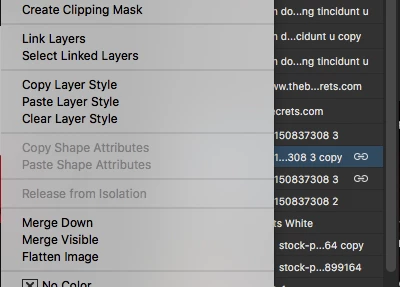
To unlink a layer click on "Link Layers" why?

  • March 25, 2019
  • 3 replies
  • 4499 views

Hi Adobe,

Might be that my OCD is kicking in but on Adobe Photoshop CC 20.0.4, I'm always looking for "Unlink Layers" on the linked layer menu but can't find it but I have to click on "Link Layers". see screenshot below:
Best Regards,

Zeeshan

    This topic has been closed for replies.

    3 replies

    Jeff Arola
    Community Expert
    Community Expert
    March 25, 2019

    Seems to work fine here using photoshop 20.0.4 on macOS Mojave 10.14.3

    Make sure you have the layers that are linked selected in the layers panel in order to see Unlink Layers

    c.pfaffenbichler
    Community Expert
    Community Expert
    March 25, 2019

    Hmm, I must have been mistaken when checking before, »Unlink Layers« is is here, too, on 20.0.4.

    Jeff Arola
    Community Expert
    Community Expert
    March 25, 2019

    It looks like it was changed or it's a bug since photoshop cs6 does show Unlink Layers without having more than one linked layer selected.

    davescm
    Community Expert
    Community Expert
    March 25, 2019

    Hi

    On this forum we are Photoshop users not Adobe staff , so can't really answer the why.

    In the layer menu "Link Layers"  changes to "Unlink layers" when the layers are already linked. However the context menu that opens when you right click in the layers panel, the item remains named  "Link layers", although it does do the same job.

    If it bothers you, you could raise a feature request/bug report here, where it will be seen by Adobe developers:

    Photoshop Family Customer Community

    Dave

    c.pfaffenbichler
    Community Expert
    Community Expert
    March 25, 2019

    Why would you do that with the contextual menu when clicking the »Link layers«-icons at the bottom of the Layers Panel achieves the same result?

    While your argument has merit in principle, it seems that contextual menu does not feature changeable wording (unlike the »proper« menu) so to address it they might have to add a line for »Unlink Layers« that would be grayed out when not applicable.