
Gadzooxtian
Participant
January 19, 2019
Question

Too many copies of Photoshop (and others)

  • January 19, 2019
  • 4 replies
  • 1262 views

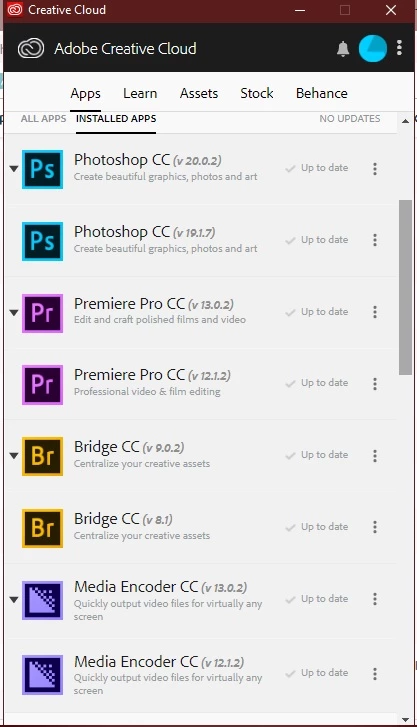
I updated my Adobe products yesterday (18/Jan) - and I now have two copies of everything apparently. I have the previous AND current version of Photoshop - and of Premiere, Bridge and Media Encoder. Am I gonna be charged for all this "extra" stuff? Shouldn't an upgrade remove previous versions? If I uninstall Photoshop v 19.1.7 - will I also lose v 20.0.2 ?

Check out this screenshot:
    This topic has been closed for replies.

    4 replies

    Gadzooxtian
    Participant
    January 19, 2019

    Thanks guys. I've been using CC for about two/ three years, it's the first time I've seen multiple versions show up after an update.

    Legend
    January 19, 2019

    They changed the default to keep the old version. People didn't know you could get it back easily, so if something was wrong with a new version it was an even bigger disaster for them.

    Community Expert
    January 19, 2019

    As others have said, you are not charged for having multiple versions of a particular Adobe product and it is not a bad thing to have multiple versions installed.

    I have multiple versions of Photoshop on my computer. The good thing about a PSD file is that you can open one created in PS 2018 in PS 2015. Having a previous version can have benefits for cases where something may not working exactly right in the new version.

    gener7
    Community Expert
    Community Expert
    January 19, 2019

    gadzooxtian  wrote

    I updated my Adobe products yesterday (18/Jan) - and I now have two copies of everything apparently. I have the previous AND current version of Photoshop - and of Premiere, Bridge and Media Encoder. Am I gonna be charged for all this "extra" stuff? Shouldn't an upgrade remove previous versions? If I uninstall Photoshop v 19.1.7 - will I also lose v 20.0.2 ?

    Check out this screenshot:

    No, you are not charged for previous versions of Photoshop on your account. You can use any version CC offers down to CS6.

    Uninstalling an earlier version does not delete a later version. Creative Cloud use to delete earlier versions by default, but since some plugins are not carried over, keeping the old copy gives the user a chance to use the plugin until an updated plugin for the new version is released.

    Gene

    JJMack
    Community Expert
    Community Expert
    January 19, 2019

    IMO it a good practice to keep  old good working version of Photoshop.  So you have a way to edit image whet Adobe brakes the current version of Photoshop or releases a new buggy version of  Photoshop. I find  The Updated version of CS6 and CC 2014 are worth keeping installed. No extra charge.

    JJMack