
Answered
Tool settings show under images
Hi everyone,
I've searched through discussions without finding an answer.
I'm working with Photoshop 2024 on macOS Sequoia and I'm having trouble with tools and tools settings: they always show under the image I'm working on.
i.e.: if I'm using the eraser tool and I need to change settings by right click on the image, the setting pane appears under the image.
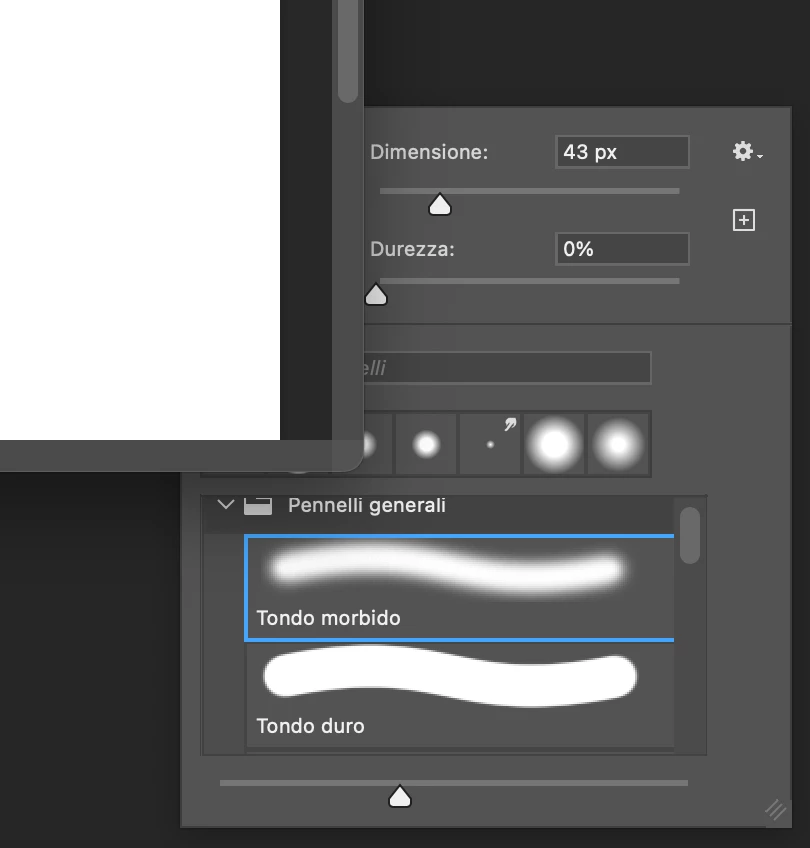
So if I click in the image center, I cannot access the tool settings.
Same with toolbar: expanding an item to select a different tool, show the pane under the image.
Long story short: the image is always in foreground and this is quite annoying.
How can I restore the correct behavior?
Thank you in advance, any helps would be appreciated.
Gabrie
 AdChoices