
Participant
February 29, 2024
Answered

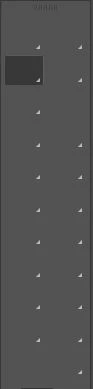
Toolbar pictograms dissapear

  • February 29, 2024
  • 4 replies
  • 208 views

Hi there,


I´ve long since had a problem with Photoshop that when I open it, the pictograms of my toolbar just dissapear (see provided screenshot). For some reason it only happens in regular photoshop and not in Photoshop Beta. It used to happen sometimes, but now it happens everytime I open Photoshop.


Does anyone know a solution to this? Thank you!
 

This topic has been closed for replies.
Correct answer Rick29674466ipj1

A fresh install and reset of preferences seems to have done the trick. Thanks everyone!

4 replies

MarekMularczyk
Community Expert
Community Expert
March 20, 2024

Good to know it's working now 🙂


Adobe Community ExpertAdobe Certified Professional
Rick29674466ipj1AuthorCorrect answer
Participant
March 5, 2024

A fresh install and reset of preferences seems to have done the trick. Thanks everyone!

MarekMularczyk
Community Expert
Community Expert
February 29, 2024

That looks very odd 🙂

Have you tried resetting Photoshop preferences?


Adobe Community ExpertAdobe Certified Professional
Ged_Traynor
Community Expert
Community Expert
February 29, 2024

@Rick29674466ipj1 try manually resetting your Photoshop preferences
https://helpx.adobe.com/ie/photoshop/using/preferences.html#Manually
Remember to backup your settings before doing the preference reset
https://helpx.adobe.com/ie/photoshop/using/preset-migration.html