

Tools Bar Hidden Behind Behind Apple Menu Bar
This bug has been around for years... if running in clam shell mode with an external monitor and the external monitor power cycles (power failure), Photoshop picks up the screen size info from the Macbook Pro display, then when power comes back to external display, all menus are position as if they were on the smaller display. That's no big deal. BUT, the Photoshop tools pallete gets stuck behind the Apple menu bar. For some reason it gets reset to the far top left. The handle to move the PS Tools bar is blocked -
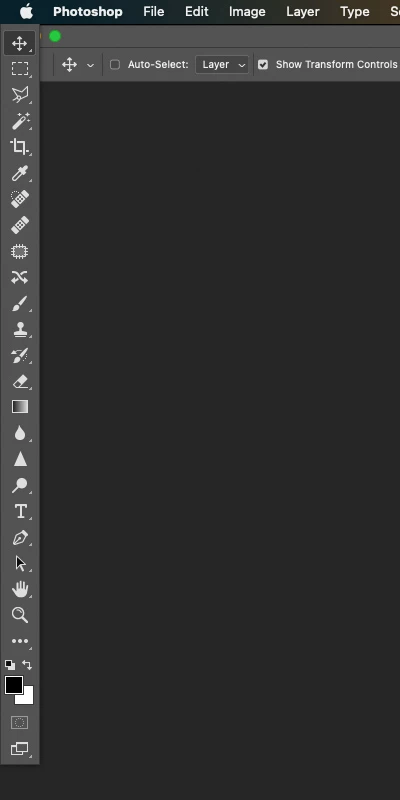
There is no fix to this I know of. I have start with a new workspace and rebuild all the menu palettes, etc... The fix is super simple (for the programmer), whatever position is assigned, add ~100 pixels so the tool bar is well below the Apple menu bar.
-------
2021 Apple Macbook Pro M1 Max
NEC 30" 302 display connected via DisplayPort (TB3 adapter)
Ventura 13.1
PS - 24.01
 AdChoices