
Participant
August 30, 2022
Answered

Top window jumps to the back when I click off from Photoshop

  • August 30, 2022
  • 4 replies
  • 2110 views

1. Photoshop 23.4.2

2. macOS Big Sur 11.6.8

3. I turn off "Open Documents as Tabs" when I work because I need to drag and drop objects between multiple windows very often. Whenever I click off the Photoshop screen, let's say, Finder, to drag a graphic into a PSD window, I figured my current working window is always hidden behind other windows. It's been like that for a few years and it's really really annoying that I'll have to find the window I'm currently working to do drag and drop. 

4. Expected result: my current PSD window should stay at the top / up front and not going behind other PSD windows. Actual result: When I click off the Photoshop screen (even without doing anything), the top window goes to the back. 
Correct answer mglush

Hi!

I can believe that would be frustrating! Unfortuately, I don't have an answer for that specific problem, but I would like to suggest another way of working that might circumvent what you are dealing with. 


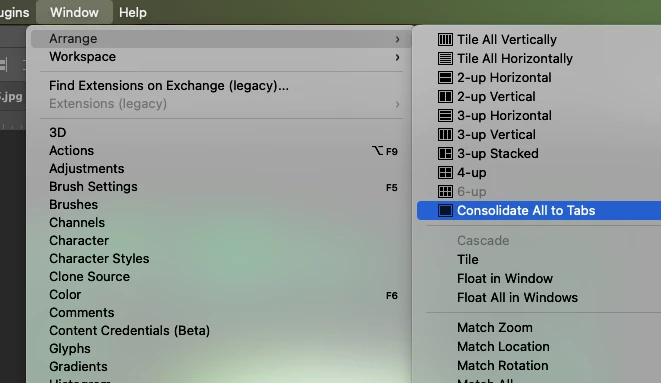
First, under the Window menu, select Arrange>Consolidate All to Tabs. This way all your documents will be in one window.

Then, find the image you want to drag into your main window and with the Move Tool, with nothing selected, click on the image in the Window and drag the image up to the tab of the main window you want to drag it to. Once you are hovering over the tab, the window will change to that main window and you can then drag the image down into the window and drop it.


You can also grab the image in the Layers Panel and drag it up to the tab and into the main window. I will often copy many layers from one file to another using this method.


I realize it doesn't fix the issue you posted about, but I thought since you've beein going through this for a couple of years, you might be interested in another possibility. 


Let us know if that helps or if you have any question.

Michelle

4 replies

Participant
October 16, 2024

Adobe please fix this maddening glitch already!

Participant
October 23, 2024

I've also had this same problem and it is very frustrating. Nothing seems to fix it.

Participant
September 18, 2024

I've had the same problem for over a year too...very frustrating and time consuming

GrossJulian
Participant
August 9, 2024

same problem, it is so frustrating. I am current with all updates and keeps happening and has been for over a year.


jane-e
Community Expert
Community Expert
August 9, 2024


quote

same problem...

By @GrossJulian


Does the same answer also work for you?


Jane


GrossJulian
Participant
August 9, 2024

no, my windows are always consolidated, it happens with the whole window. click once it sends to the back, click again brings forward.


Mac Studio running sonoma 14.0 photoshop up tp date

mglush
Community Expert
mglushCommunity ExpertCorrect answer
Community Expert
August 31, 2022

Hi!

I can believe that would be frustrating! Unfortuately, I don't have an answer for that specific problem, but I would like to suggest another way of working that might circumvent what you are dealing with. 


First, under the Window menu, select Arrange>Consolidate All to Tabs. This way all your documents will be in one window.

Then, find the image you want to drag into your main window and with the Move Tool, with nothing selected, click on the image in the Window and drag the image up to the tab of the main window you want to drag it to. Once you are hovering over the tab, the window will change to that main window and you can then drag the image down into the window and drop it.


You can also grab the image in the Layers Panel and drag it up to the tab and into the main window. I will often copy many layers from one file to another using this method.


I realize it doesn't fix the issue you posted about, but I thought since you've beein going through this for a couple of years, you might be interested in another possibility. 


Let us know if that helps or if you have any question.

Michelle