MahaB82A
Legend
September 25, 2023
Question

Transform in Properties Panel

  • September 25, 2023
  • 1 reply
  • 896 views

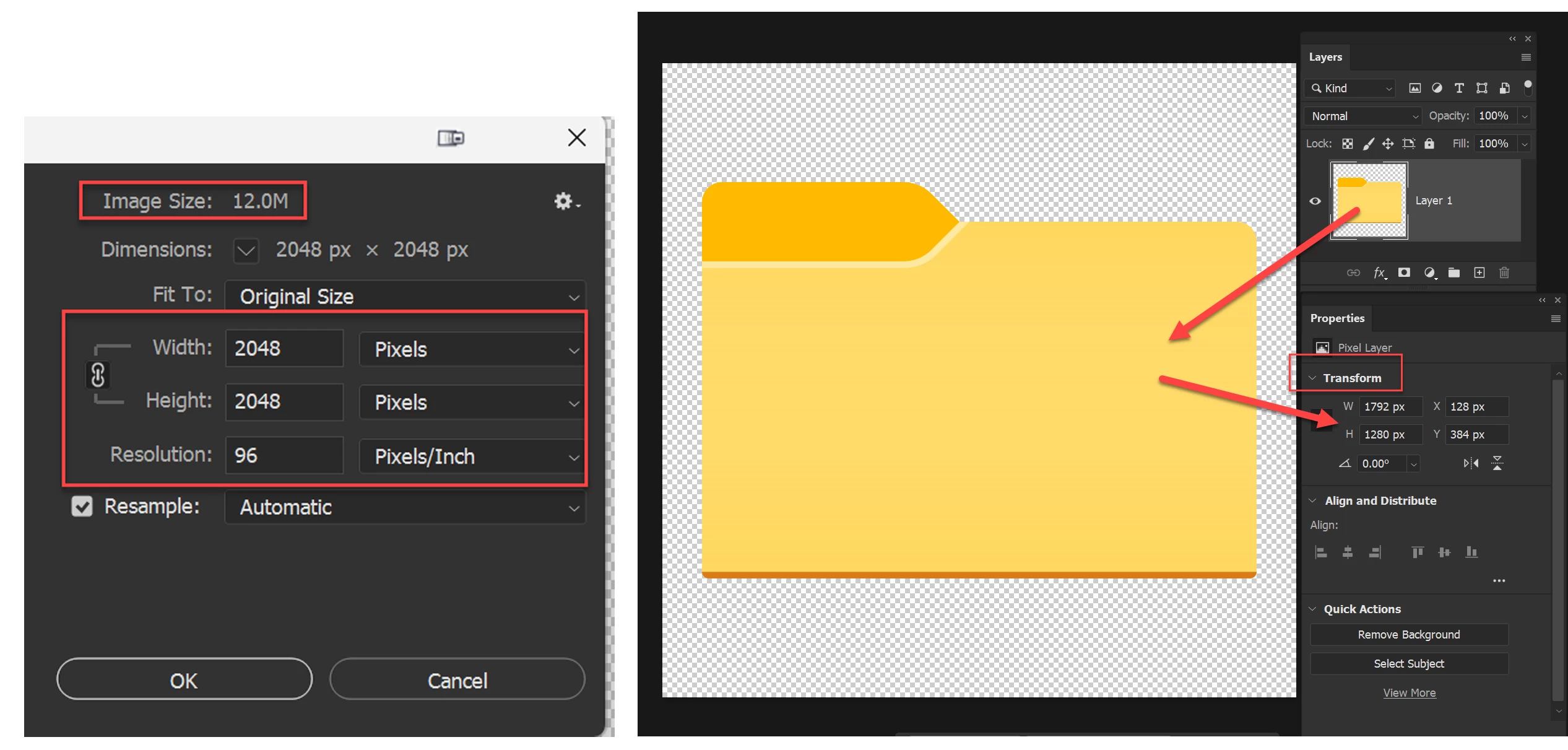
What does Transform in Properties panel mean? Because pixel in transform panel does not match with pixel in Image size


This topic has been closed for replies.

1 reply

Omar.Fathy
Community Expert
Community Expert
September 25, 2023

The transform attributes in the properties panel are the attributes of the selected layer but the attributes in the Image Size window are the dimensions of the canvas size (the full working area).
You can use the transform attributes in the properties panel to edit the layer instead of useing Edit> Free transform for example.

MahaB82A
MahaB82AAuthor
Legend
September 25, 2023

What you say is whether it is Image Size or Canvas Size, it is same. What is purpose of having separate tools for these two? 


Omar.Fathy
Community Expert
Community Expert
September 25, 2023

No, the Image size and Canvas size have different usage.
Canvas size increases or decreases the workable area, while image size increases or decreases the actual size of the image opened in the program.
Canvas size increase or decrease the size without scaling layers or design. Image size scale up or down the whole design and layers when you change the size. 
We use Canvas Size when we need to add an additional size to the design without affecting the layers and images in it. Or to cut a part of the design without scaling images down.