Inspiring
November 6, 2021
Answered

Transform tool - Shift constrain

  • November 6, 2021
  • 2 replies
  • 812 views

Once again Adobe makes changes to legacy functions that throw a wrench into my workflow. Using Shift to constrain proportions has been the standard for decades (in all applications) and now they remove it in v.23. Can you please implement a preference that allows us to disable this change?
This topic has been closed for replies.
Correct answer Jeff Arola

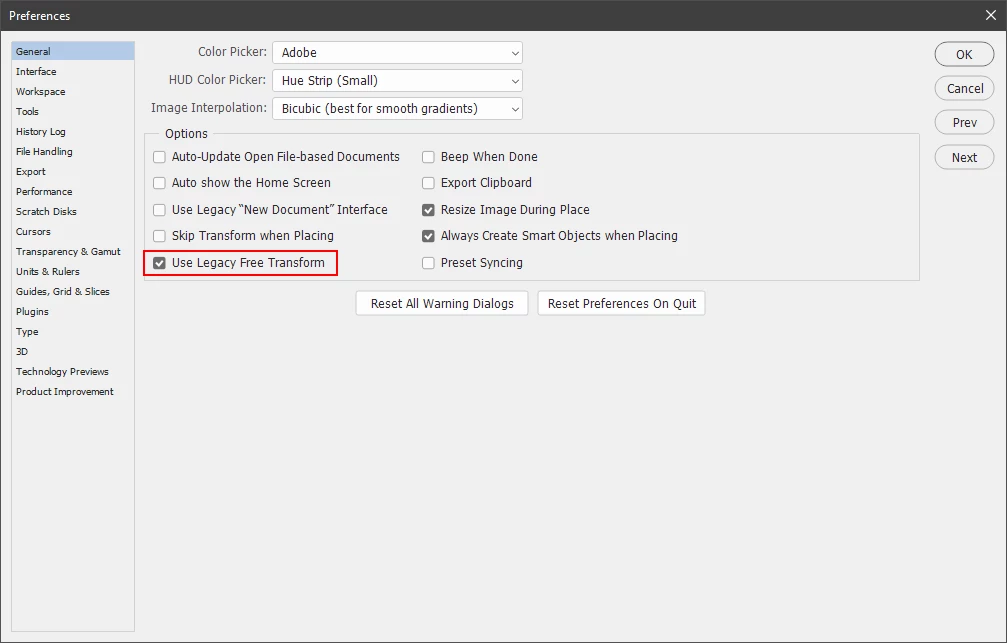
In photoshop go to Photoshop>Preferences>General and check Use Legacy Free Transform

(Edit>Preferences>General on windows).


2 replies

Jeff Arola
Community Expert
Jeff ArolaCommunity ExpertCorrect answer
Community Expert
November 6, 2021

In photoshop go to Photoshop>Preferences>General and check Use Legacy Free Transform

(Edit>Preferences>General on windows).


Known Participant
January 6, 2022

Oh my gosh, thank you!  I just updated late last night and everytime I used my move tool, it jumped all over the place while designing a illustration, how incredibly frustrating.   I have made the above changes and it seems to have helped.  

THANK YOU! 

lambiloon
Community Expert
Community Expert
November 6, 2021

Hi if its not in preferences then its permanent so this will be easy for new people to understand...regards

Ali Sajjad / Graphic Design Trainer / Freelancer / Adobe Certified Professional