parkerclvs
Participant
September 4, 2020
Answered

Transform tool wonky

  • September 4, 2020
  • 1 reply
  • 519 views

Is anyone else having issues with the transform tool after this latest update to photoshop?  In the last couple of days, I'm working along in my project just fine, then randomly when I'm using the transform tool to grab and move or resize my object, it jumps across the screen.  I find my self chasing it to drag it back in place only to have it disappear altogether.  Today it also has decided to resize my object when I'm just trying to move it.  After trying again to transform the object and having the same thing happen, I end up shutting it all down, including the CC interface (just logging out of photoshop won't work) and then opening it again.  This works for a while but then it happens again a short time later.  Very frustrating!
This topic has been closed for replies.
Correct answer

Hi

Not having that issue with Photoshop version 21.2.2 on Windows, I have noticed sometimes that while dragging an image with the hand tool the image would shot up to the right corner of the workspace, restarting Photoshop fixes it for a while, so could be similar to what you have.

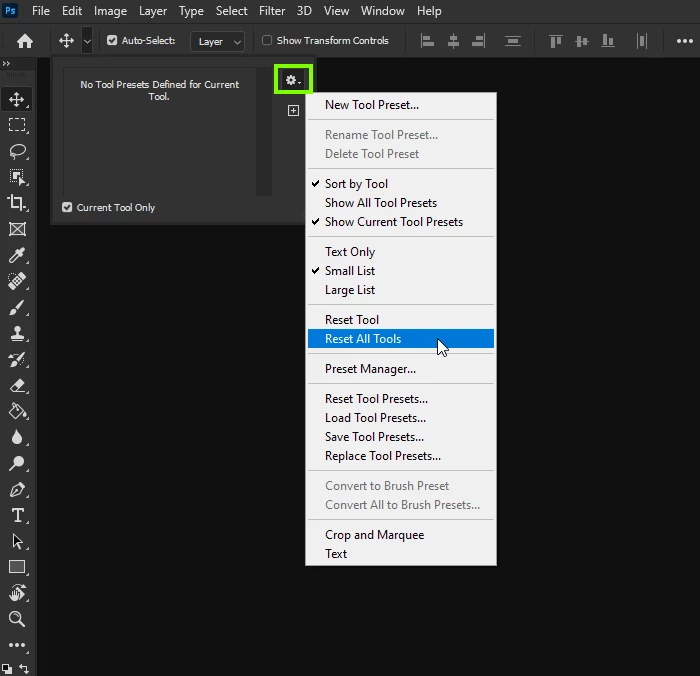
Have you tried resetting the Tools

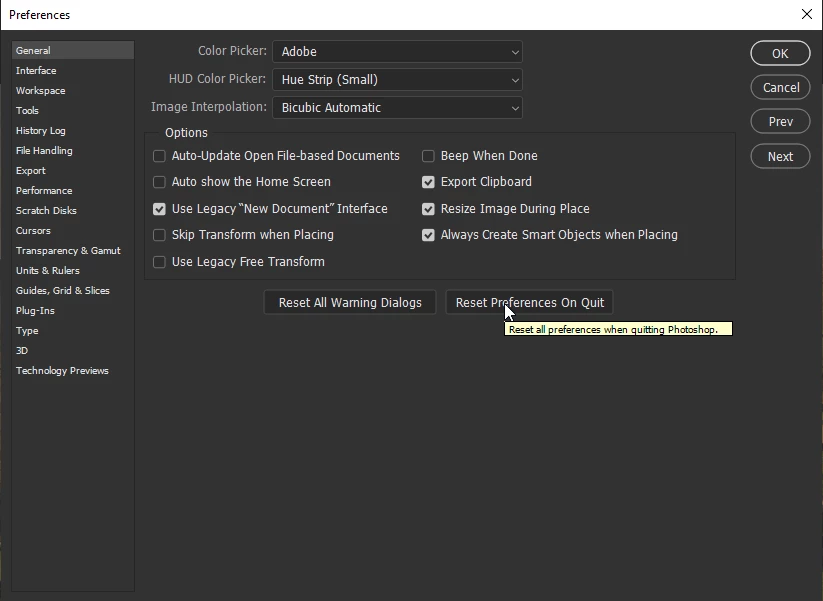
If that does help try a preference reset, you should backup custom settings beforehand

https://helpx.adobe.com/ie/photoshop/using/preset-migration.html

1 reply

Correct answer
September 4, 2020

Hi

Not having that issue with Photoshop version 21.2.2 on Windows, I have noticed sometimes that while dragging an image with the hand tool the image would shot up to the right corner of the workspace, restarting Photoshop fixes it for a while, so could be similar to what you have.

Have you tried resetting the Tools

If that does help try a preference reset, you should backup custom settings beforehand

https://helpx.adobe.com/ie/photoshop/using/preset-migration.html

parkerclvs
Participant
September 4, 2020

Hi Ged,


Thanks for your reply and the tips. I just did both and I'm crossing my fingers that it works.  I, too, am working with version 21.2.2 on Windows. BTW I also had that problem with the hand tool although it hasn't done that for a couple of weeks.

parkerclvs
Participant
September 12, 2020

UPDATE: Resetting the tools fix has worked so far.  I still have to close out my project after the reset then open back up but it's only happened one other time since my initial post.  Thanks again, Ged.