
Elisei Kulikovsky
Known Participant
November 2, 2019
Answered

Transparent text and shapes look different in CC 2018

  • November 2, 2019
  • 1 reply
  • 428 views

In my PS CC 2018 text and shapes with the same transparency (50% white, Normal blending mode) look different.
See the sample (the second text line is actually a shape converted from the upper text). Is it a bug or the way it should be?
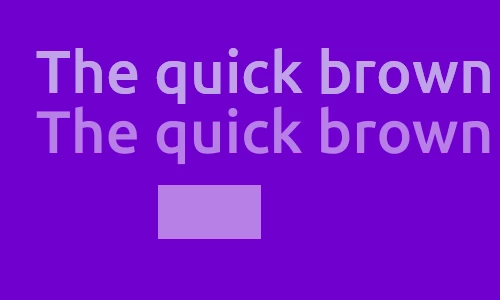


Adobe CC 2018 on Win 10 x64.

This topic has been closed for replies.
Correct answer r-bin

Menu->Edit->Color Settings->Blend Text Colors Using Gamma -> turn OFF.

1 reply

r-binCorrect answer
Legend
November 2, 2019

Menu->Edit->Color Settings->Blend Text Colors Using Gamma -> turn OFF.

Elisei Kulikovsky
Known Participant
November 3, 2019

Excellent! Thank you very much!