
Known Participant
August 13, 2017
Answered

Triangles Missing from Highlight and Shadow Clipping Boxes in ACR Histogram

  • August 13, 2017
  • 1 reply
  • 662 views

In my copy of ACR (the latest update) the triangles that change colour (to black when no clipping) in the top right and left of the histogram are missing. Can anyone advise on how to get these back or does the latest version of ACR not have them?

This topic has been closed for replies.
Correct answer davescm

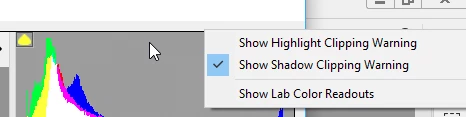
They are still part of ACR - this is version 9.12 :

If you right click on the Histogram you get the menu to use them on the image but I don't know a way to show/hide the actual triangles

Have you tried unchecking "Use Graphics Processor" in Camera Raw Preferences. It often accounts for unusual display issues.

Dave

1 reply

davescm
Community Expert
davescmCommunity ExpertCorrect answer
Community Expert
August 13, 2017

They are still part of ACR - this is version 9.12 :

If you right click on the Histogram you get the menu to use them on the image but I don't know a way to show/hide the actual triangles

Have you tried unchecking "Use Graphics Processor" in Camera Raw Preferences. It often accounts for unusual display issues.

Dave

Known Participant
August 13, 2017

Dave

I just unchecked the "Use Graphics Processor" (whatever that means?) and it did indeed cure the problem.

Thanks You

Eddie

davescm
Community Expert
Community Expert
August 13, 2017

You're welcome.

The GPU is your video card processor and whilst it is needed by Photoshop for many of the functions, in ACR most will notice little difference with it on or off. With it off for ACR your computer processor will calculate the screen redraws and in your case do it correctly.

Note - switching it off for ACR is separate to switching it on/off for Photoshop so you do not lose any Photoshop functionality.

Dave