
Trouble activating pre-existing alpha channel (TIFF)
Hello. I am an archivist who discovered some very rare renders from a press disc, available in TIFF format only. The TIFF images have transparency already, and show that way in some previews, but I want to convert them to lossless PNG anda few other formats.
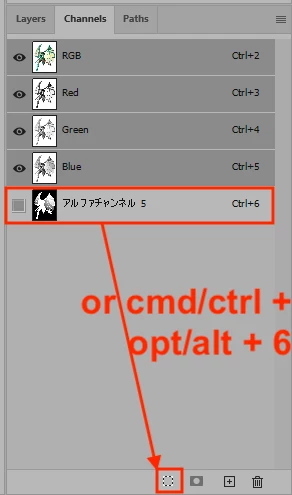
I have put the TIFF images into Photoshop. By default, I see the image in a locked BG layer with white in the background (empty?) space. I can flip to the Channels tab and see RGBA. When I tick the alpha channel on alongside the other three, the image stays normal-colored but the white background becomes a soft reddish-orange. With only the alpha channel enabled, the image is white and the empty space is black.
This tells me the image has alpha masking of some kind already. I have looked through 20 different guides, but most of them just say how to make a mask rather than how to extract one that already exists in a TIFF file and my own attempts have failed. I'd love some more specific directions, please. If you need any more context, please let me know and I'll reply with more info. My goal is to select the content area, and paste it into a plain layer of its own with transparency from the included alpha channel. Thanks in advance!
 AdChoices