Participant
January 6, 2019
Answered

Trouble inserting characters

  • January 6, 2019
  • 1 reply
  • 580 views

I am trying to insert a math symbol into some text (specifically, the symbol ∩ for intersection).  I have tried this two ways.  One is to use the character viewer on my Mac and double-click on the symbol I want to insert.  When I do this I get a rectangle with an X inside it instead of the symbol ∩.  This is exactly the method I used to insert all three of these ∩ intersection symbols in this post so the glitch specifically has to do with Photoshop.  The second way is to insert the symbol into a Word document, and then copy and paste the symbol.  Again, I get the rectangle with the X inside it.  I am running the latest version of Adobe Photoshop CC 2019 and Mojave 10.14.2 if it matters.  Suggestions? 
    This topic has been closed for replies.
    Correct answer jane-e

    Hi Steve,

    What typeface are you using?

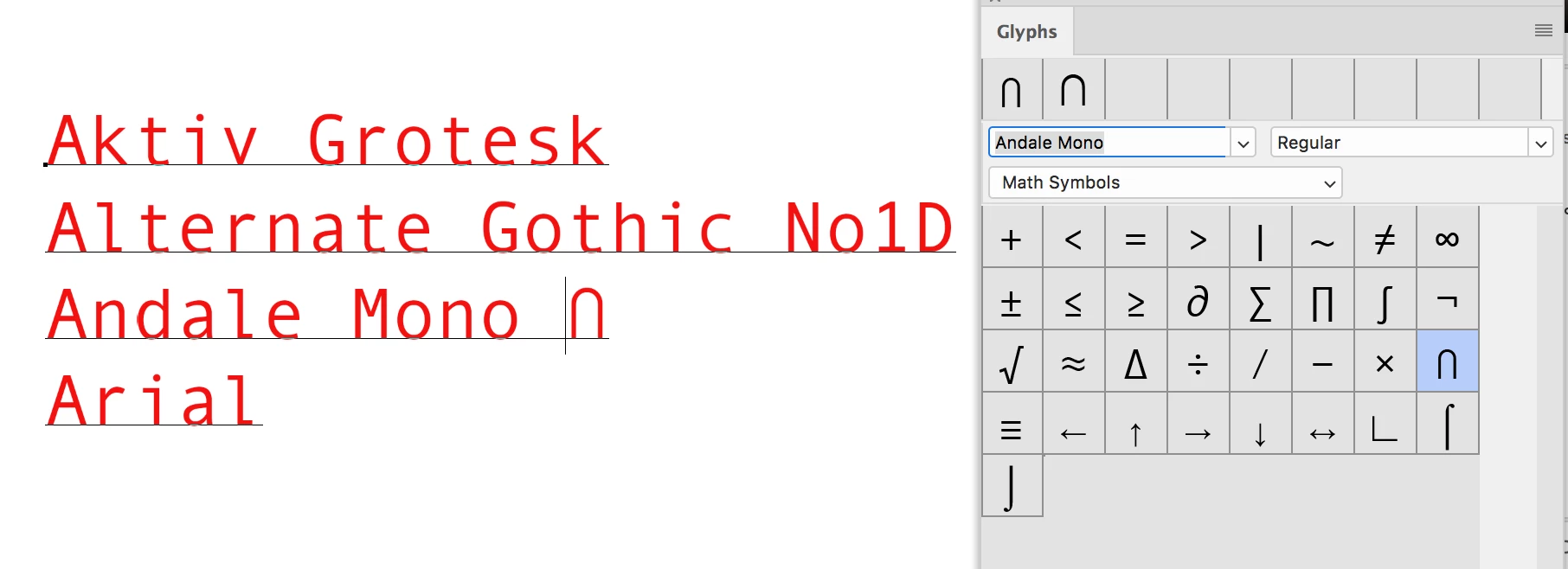
    I opened the Glyphs panel and set the filter to Math Symbols, then started going through the typefaces. I stopped after I found it in four different typefaces, listed here. If it's not in the typeface you are using, then change to a typeface that has it when you use that symbol.

    Jane

    1 reply

    jane-e
    Community Expert
    jane-eCommunity ExpertCorrect answer
    Community Expert
    January 6, 2019

    Hi Steve,

    What typeface are you using?

    I opened the Glyphs panel and set the filter to Math Symbols, then started going through the typefaces. I stopped after I found it in four different typefaces, listed here. If it's not in the typeface you are using, then change to a typeface that has it when you use that symbol.

    Jane

    Participant
    January 6, 2019

    Ahhh.  I didn't realize the glyphs are dependent on the type of font.  So, this is one solution to the problem and I tried it and it does work.  But it still seems there is some problem/incompatibility since I can't do it in Photoshop by double-clicking using the Mac character feature, but it works fine to do it that way with other programs like Word.  Thank you!   

    jane-e
    Community Expert
    Community Expert
    January 6, 2019

    Hi Steve,

    Word also lets you add bold to typefaces that don’t have bold and italics to typefaces that don’t have italics. Adobe software doesn’t let you do things like that when they don’t exist which means you won’t get into trouble when you go to press as you would with a Word document!

    Photoshop has Character Styles, and you could create a Character Style for the typeface you need for this symbol if you are going to be using it a lot.

    There should be a host of other typefaces that work. I stopped looking after I found four. The Mac Character Viewer does work if you are using a typeface that includes this symbol.

    Jane