MacOS does not have a "Always Open with" checkbox when setting file associations. That's Windows.
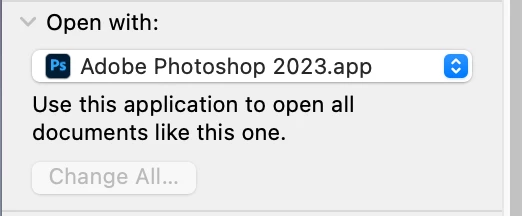
To set it up for the Mac, select (not open) a Ps file, then use the Cmd i keyboard shortcut to bring up the Info dialog.
Go down to the "Open with" section and choose Photoshop 2023.app from the dropdown menu if Preview is selected.
That will only change the association for that one file. Click the "Change all" button to open all Photoshop files with Photoshop 2023.
Then if you choose to right or Ctrl-click on a a file Photoshop 2023 will be the default. I don't use that option unless I want a different program on the list to open a PSD. Even then it's "one time" until I change the default. Just double-click the Photoshop file to open the file and launch Photoshop. Same cmd i change goes for any graphic filetype (jpeg, png, psb, tif and gif) you want to open by default in Photoshop.
 AdChoices