
greeener
Participant
March 4, 2017
Answered

Trying to put images into photoshop but they end up distorted

  • March 4, 2017
  • 2 replies
  • 568 views

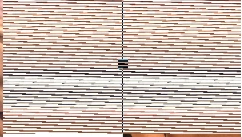
I googled for solutions and checked forums but cannot find anything...I'm trying to make a fitness flyer for a friend, but when I put pictures into it, the images become distorted and look awful. For example: http://imgur.com/a/azZEB

The thing is, the image is still there and looks fine when I export it, it's just impossible to work with in actual photoshop. I have tried updating and uninstalling and reinstalling, nothing so far has worked.

I'm really new to photoshop so I'm not sure how to troubleshoot this. I am using 2015.5 CC version, on a macbook pro on OS X 10.9.5. Any ideas on how to remedy this? Thanks in advance.
This topic has been closed for replies.
Correct answer Zaid Al Hilali

Something is wrong with the image you've uploaded, is this how you see it on your screen

If so, then there is a Graphics Card issue here.

2 replies

Zaid Al Hilali
Community Expert
Zaid Al HilaliCommunity ExpertCorrect answer
Community Expert
March 5, 2017

Something is wrong with the image you've uploaded, is this how you see it on your screen

If so, then there is a Graphics Card issue here.

Nancy OShea
Community Expert
Community Expert
March 4, 2017

Go to File > Open > select image from your computer.  Hit OK.

Repeat for other images in your project. 

Images opened this way will not be distorted.  If they seem distorted, move your Navigator's slider level to 100% or lower.   See screenshot.

Nancy

Nancy O'Shea— Product User & Community Expert
greeener
greeenerAuthor
Participant
March 4, 2017

This kind of works...but I still cannot copy and past images without them becoming distorted. I can't keep on using Photoshop without being able to copy and paste. How do I fix this?

Nancy OShea
Community Expert
Community Expert
March 4, 2017

What is the poster's height, width and PPI in pixels?

What is the height, width and PPI of your various images?

What method are you using to "copy & paste"?

Nancy

Nancy O'Shea— Product User & Community Expert