Participant
September 28, 2023
Answered

turn off ai generate fill, can't crop without

  • September 28, 2023
  • 2 replies
  • 1433 views

turn off ai generate fill, can't crop without


can't figure how to turn off

    This topic has been closed for replies.
    Correct answer Kevin Stohlmeyer

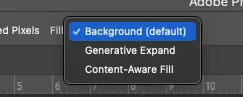
    @binh25002162q83l select the Crop Tool. Then in the options bar at the top change your Fill setting.
     

    2 replies

    kglad
    Community Expert
    Community Expert
    September 29, 2023

    in the future, to find the best place to post your message, use the list here, https://community.adobe.com/

    p.s. i don't think the adobe website, and forums in particular, are easy to navigate, so don't spend a lot of time searching that forum list. do your best and we'll move the post if it helps you get responses.


    <"moved from using the community">
    Kevin Stohlmeyer
    Community Expert
    Community Expert
    September 29, 2023

    @kglad where did you move this from?

    kglad
    Community Expert
    Community Expert
    September 29, 2023

    @Kevin Stohlmeyer 


    it was moved from using the community

    Kevin Stohlmeyer
    Community Expert
    Kevin StohlmeyerCommunity ExpertCorrect answer
    Community Expert
    September 28, 2023

    @binh25002162q83l select the Crop Tool. Then in the options bar at the top change your Fill setting.


    Participant
    September 29, 2023

    Could not see it...now it's obvious...Thank you!