
Answered
Turn off multiple selections
This is probably really simple to do but I can't find the option and it's driving me mad:
I've been regressing Photoshop backwards to try to find a version that works at a reasonable speed and the version I'm working with at the moment is 20.0.10.
A behaviour has changed:
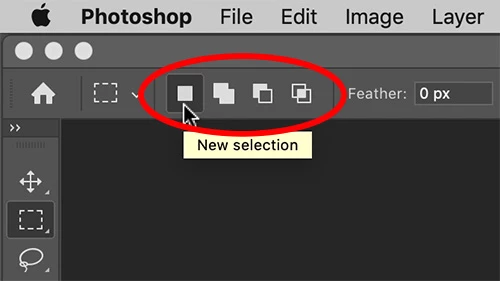
When I drag the mouse to select a square in an image, it doesn't clear the previously highlighted selection.
How do I set this back so that it does, and if I want to select two areas at once I have to hold down CTRL or SHIFT or whichever it is, as it was before?
Thanks!
 AdChoices