
Participant
March 14, 2019
Question

Turn off OpenType features forever

  • March 14, 2019
  • 3 replies
  • 1128 views

Hello everybody.

I have a question.

Is it possible turn off Open type features forever?
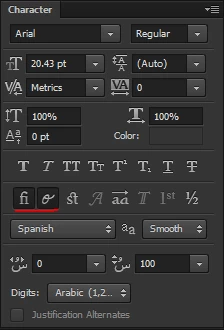
Because, every time I create a new layer text, the options "Standard Ligatures" and "Contextual Alternates" are activated automatically. So, then I have to deactivate them manually or using a event script in Event Manager. But, I would like the OpenType features to be an option in Photoshop Preferences.

Thanks for your time.

This topic has been closed for replies.

3 replies

ghzmatra
Participant
August 14, 2019

I have the same Problem.

Is there any solution to deactivate this in general preferences?

Tom Winkelmann
Inspiring
August 14, 2019

The values required for this are stored in the "Adobe Photoshop CC 2019 Prefs.psp" file and are temporarily saved during the Photoshop session and permanently in the file when you quit Photoshop.

If this does not work, this could be due to limited access rights ...

Under Windows, I would suggest launching Photoshop as "Administrator" or setting the appropriate permissions for the folder or file ...

Participant
May 24, 2019

Anybody ever get an answer for this?  One of the more annoying "features" of PS/CC

c.pfaffenbichler
Community Expert
Community Expert
March 14, 2019

Maybe you should post a Feature Request over at

Photoshop Family Customer Community