Inspiring
March 18, 2017
Answered

Turn on Laso for Pen Tool

  • March 18, 2017
  • 3 replies
  • 1114 views

I've used the feature in the past on the pen tool. I don't remember how to activate it. It's attaches a string to the pen tool very much like the laso tool does.

Except it's the actual Pen Tool in all it's glory.

I'm using the newest version of PS CC

Thank you so much, this is making me a little crazy because I know it's easy to enable.I had to reinstall Windows with a fresh HD so I lost all my PS  settings
    This topic has been closed for replies.
    Correct answer terrys30580497

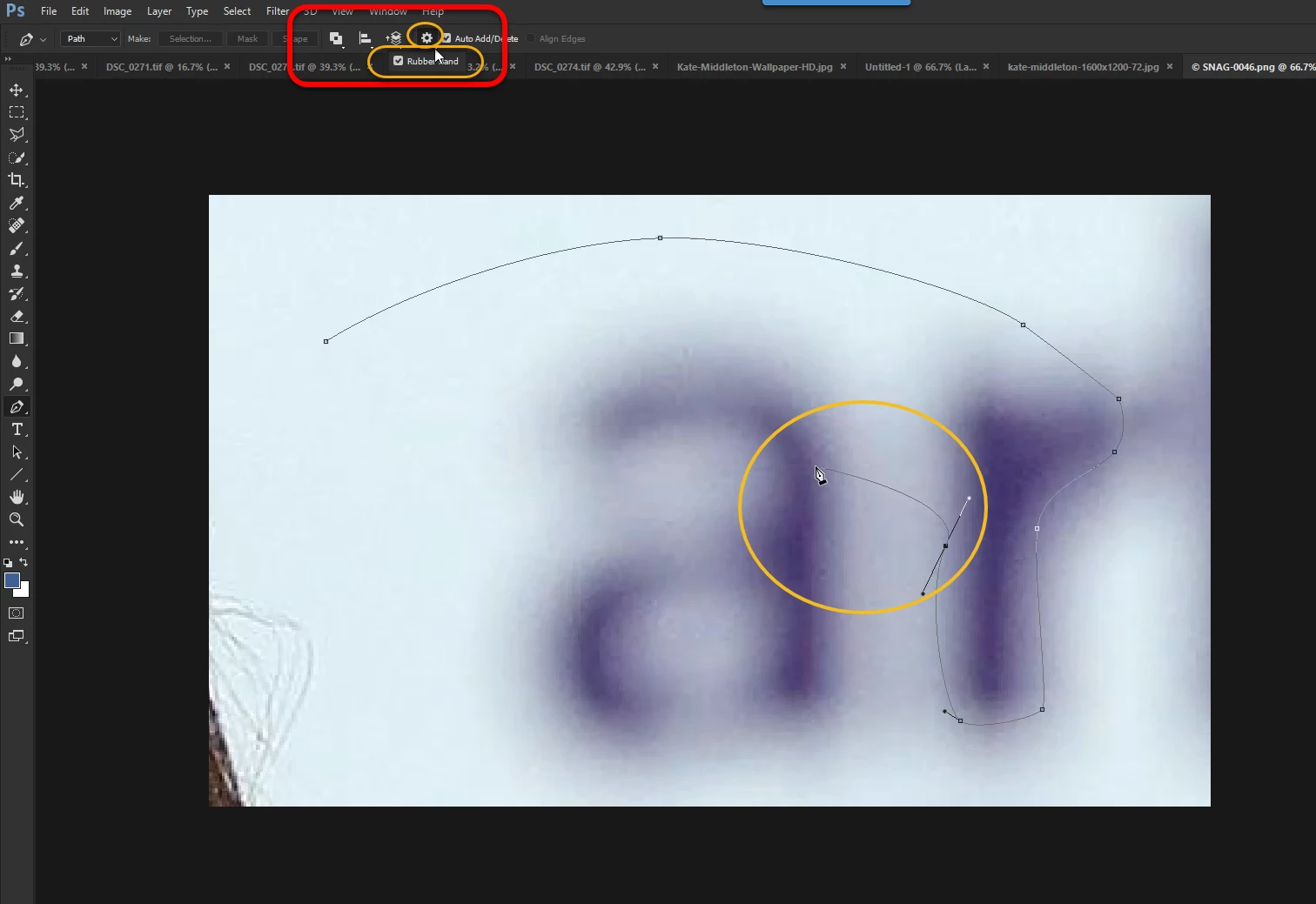
    I found It, it is called the "Rubber Band"

    You turn it on using the toolbar settings at the top of the UI.

    Here's an Image of it.If you've never used it before, try it.It can helps a lot at times.

    3 replies

    terrys30580497AuthorCorrect answer
    Inspiring
    March 18, 2017

    I found It, it is called the "Rubber Band"

    You turn it on using the toolbar settings at the top of the UI.

    Here's an Image of it.If you've never used it before, try it.It can helps a lot at times.

    S_Gans
    Community Expert
    Community Expert
    March 18, 2017

    Are you referring to the Curvature Tool?

    Adobe Community Expert / Adobe Certified Instructor
    Inspiring
    March 18, 2017

    No but thanks , it's a nice feature. As you move the pen tool a "String/Rubber band" It looks a bit like this image, it shows you how the next part of the path will look before you actually apply the next point.

    The Red line is what the rubber band looks like and the Pen Tool is floating out in space.It's not a perfect depiction.But it's the feature in a nut shell.I watched a you tube video a long time ago that told me how to turn the feature on. 

    S_Gans
    Community Expert
    Community Expert
    March 18, 2017

    Good find! Glad you found it! I'd forgotten about that one!

    Adobe Community Expert / Adobe Certified Instructor
    Community Expert
    March 18, 2017
    Inspiring
    March 18, 2017

    I already know how to use the Pen Tool,

    This answer is NOT correct and it's not what I'm looking for.

    It's called a rubber band or something like that.When you move the pen tool to it's next point the rubber band follows and gives you a good idea of it's path if you apply the next point.

    Thanks for trying but I'm looking for a known feature, not lessons.