Participant
October 16, 2022
Answered

Turning a parian sculpture bronze

  • October 16, 2022
  • 4 replies
  • 523 views

Hi all, 


Would love some help, i'm trying to make a parian sculpture appear bronze but failing miserably, any ideas or filters to achieve a realistic bronze effect not suing the sculptures details? 


Thanks!

This topic has been closed for replies.
Correct answer davescm

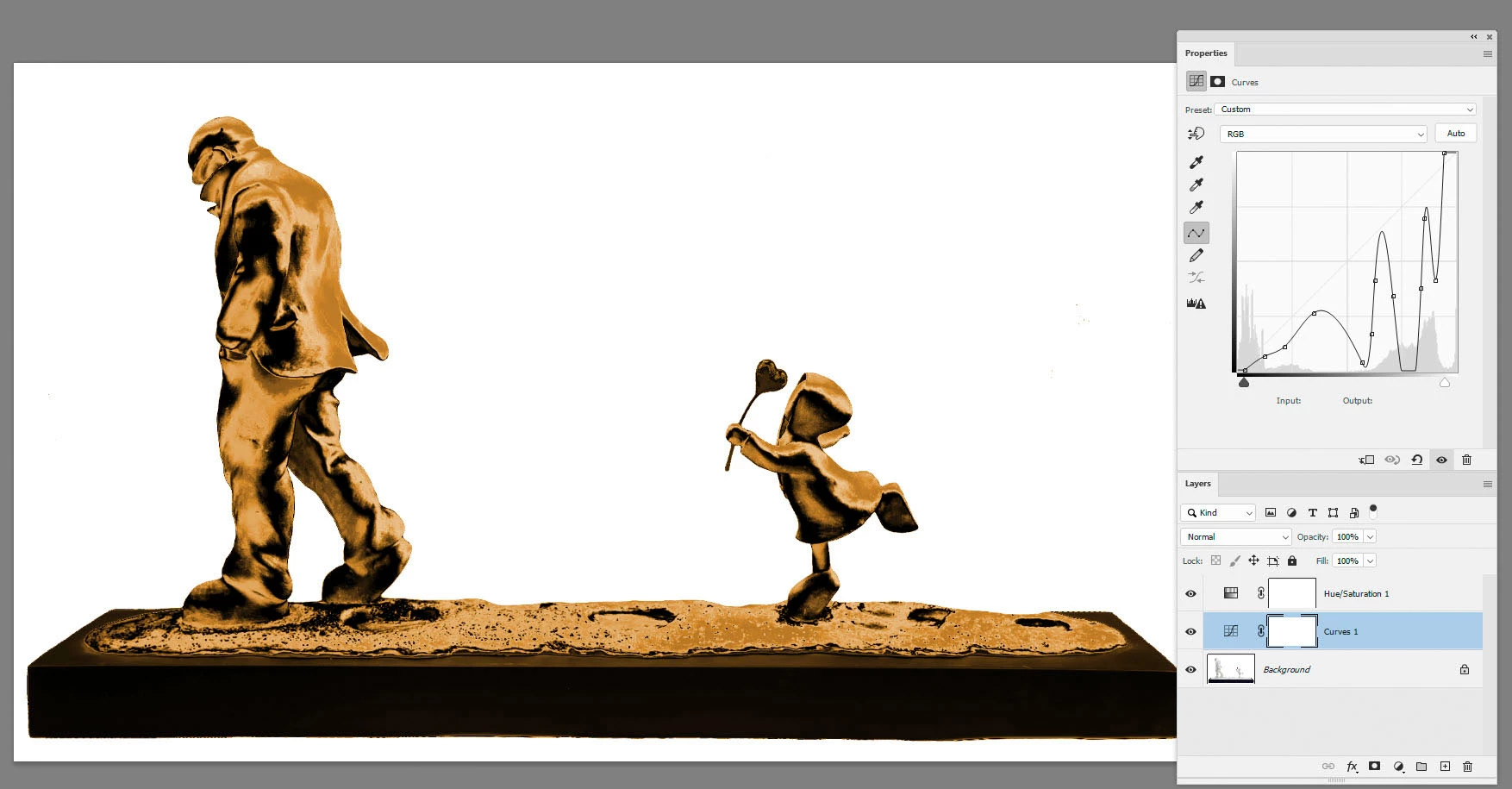
You can do a lot with a curve adjustment layer and a Hue /Sat layer set to an orange colour (with colorize checked) on top of it.

Remember, that shiny coloured metals do not reflect highlights as white - they colour the lighter highlights (unlike glossy non metals).

Quick and dirty example below.
 

Dave


4 replies

Chuck Uebele
Community Expert
Community Expert
October 17, 2022

Some great ideas, here. Just when I think of bronze, I think darker, more green and not so yellow. 

c.pfaffenbichler
Community Expert
Community Expert
October 17, 2022

One could probably get really into it with the green copper rust, trying to apply it to particularly exposed edges and such. 

Trevor.Dennis
Community Expert
Community Expert
October 16, 2022

I've gone in a different direction.


The end result

As Dave and Christoph have told you, the tonal value of an object affects how a color overly set to the Color blend mode works.  I have seperated the base and figures, and made the figures layer a Smart Object.  Then used the Camera RAW filter to control the tonal range of the figures.  Being a smart Object, you can kleep going into Camera RAW to fine tune.


These are the Camera RAW settings I used 


...and how it looked with the layer set to Color Mode


If you want your bronze to look shiny, add some highlights.  You can had paint if you have a steady hand, but I like to run work paths along the highlight areas and stroke the paths with near white, and then add a tiny bit of Gaussian blur


I have checked Simulate Pressure so that the stroke has tapered ends

That's about it.  I used two layers for the highlights because I needed to use less blur to the small figure.


davescm
Community Expert
davescmCommunity ExpertCorrect answer
Community Expert
October 16, 2022

You can do a lot with a curve adjustment layer and a Hue /Sat layer set to an orange colour (with colorize checked) on top of it.

Remember, that shiny coloured metals do not reflect highlights as white - they colour the lighter highlights (unlike glossy non metals).

Quick and dirty example below.


Dave


c.pfaffenbichler
Community Expert
Community Expert
October 16, 2022

In this case the problem is, to some extent, the red heart-shape on the green stick. 

If one wants to treat it along with the whitish matter one needs to neutralize and brighten it a bit. 

bellsh33Author
Participant
October 16, 2022

So helpful, thank you so much! Luckily the stem and heart are the only elements that won't be bronze so I can work around those :).

c.pfaffenbichler
Community Expert
Community Expert
October 16, 2022

Edit: Gradient Map and Curves Adjustment Layers and some Sharpening might help.