
Participant
October 6, 2023
Question

Tutorial Bug or Missing Something?

  • October 6, 2023
  • 3 replies
  • 256 views

I just updated to the latest version of Photoshop, was prompted to go through the Generative AI tutorial. Pretty awesome.
But when I got to Part 4, Creating a Variation, it says after clicking the house I can adjust the selection by clicking the option in the Contextual Taskbar. Except there is no option for that. I've tried turning it off and back on, resetting defaults.
Is this a bug or am I missing something somewhere? The tutorial shows 6 options that I don't have on my bar at all. 
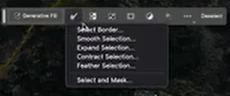
 < Tutorial options


 < My options


This topic has been closed for replies.

3 replies

c.pfaffenbichler
Community Expert
Community Expert
October 7, 2023

Do you have an active selection? 

Could you please post screenshots with the pertinent Panels (Toolbar, Layers, Options Bar, …) visible? 

Myra Ferguson
Community Expert
Community Expert
October 6, 2023

After generating content in Photoshop version 25.0, you should see the variations in the Properties panel. In the Contextual Taskbar, you should see numbers with left and right arrows to switch between the variations.

Trevor.Dennis
Community Expert
Community Expert
October 6, 2023

I can only guess without seeing the tutorial, but the Contextual Task Bar is 'contextual' as it's name suggests, and it's contents and options depend on what tool you have selected, whether there is an active selection, or maybe a layer mask selected.  So my guess is that you do not have the right tool selected, or layer mask selected, or active selection etc.


Is it a video tutorial?  If yes, look at the workspace carefully, and try to emulate the same conditions.  Photoshop has a steep learning curve when you start using it as a beginner, but stick at it and you'll soon be helping us answer other people's questions.+
