Participating Frequently
December 13, 2016
Answered

Tutorial.psd

  • December 13, 2016
  • 2 replies
  • 3193 views

HI everyone

Everytime I open Adobe cc 2017, the tutorial.psd file opens.

How do I deactivate it?
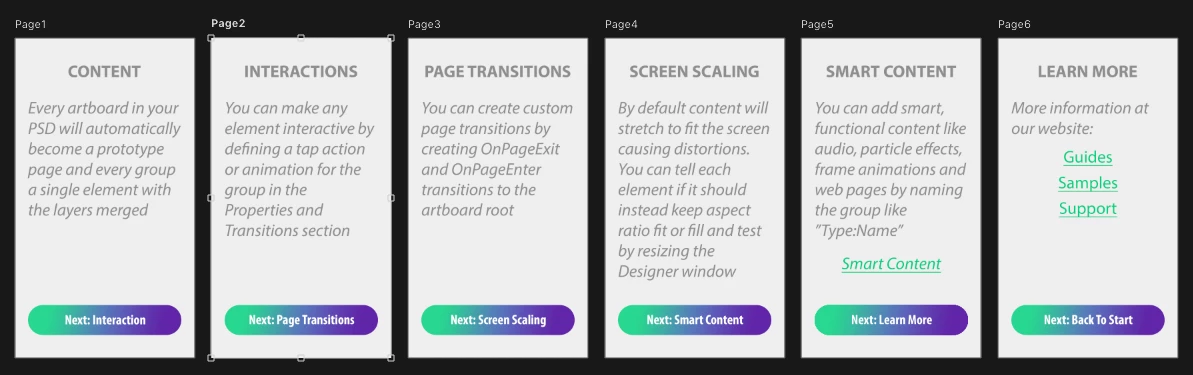
Thanks in advance... it's driving me CRAZY!

This topic has been closed for replies.
Correct answer Terri Stevens

I tried, it still seems to pop up without internet


Do a search for 'tutorial.psd' and move it to the desktop. Does that make any difference?

2 replies

Participating Frequently
December 15, 2016

Hi guys, Has no one found a solution yet?

Trevor.Dennis
Community Expert
Community Expert
December 15, 2016

I'm guessing it has to be online.  What happens if you disconnect from the internet?

Participating Frequently
January 5, 2017

Interesting, it looks to me as if you have the SketchMyAPP extension installed. This is a third party tool for prototyping layouts for mobile devices. What it does is create PSD files on the fly for preview in a special SketchMyApp viewer and it seems to use Generator to create the previews. Does anyone else use your computer? Because you do have to consciously put SketchMyApp on your system as it doesn't come with Photoshop and you also need a Dropbox account. It was impossible to know but turning generator off in the preferences would probably have stopped tutorial.psd appearing.

If you would like to see a video of exactly what the app does click the link below and scroll to 'watch the video'

SketchMyApp – Prototype Driven Design for Photoshop

It might be worth checking if SketchMyApp is on your machine otherwise this could happen again. The video shows where to look in the Adobe desktop application and also on the extensions list.


I'm using a shared cloud account, it's possible someone else downloaded it. Thanks for your help, and advice

Trevor.Dennis
Community Expert
Community Expert
December 13, 2016

Have you ever had these files open in Photoshop?

Do you have the Start Screen show when you open Photoshop, and is it set to display Recent Files or CC Files ?

You can chose to view either thumbnails or a list

Or turn off the Start Screen all together in Preferences.

I don't know if I have covered your issue because I have never seen anything like it on my screen.

Participating Frequently
December 13, 2016

I've never opened the tutorial.psd file before.

I've been using photoshop for almost 15 years, so I wouldn't need that file.

Yes, I've turned off the welcome screen, so I don't think it sits there...

Terri Stevens
Legend
December 13, 2016

Have a look if there is anything in the folder below. If you are on Windows you'll have to make hidden files and folders visible. If there is anything in the AutoRecover folder just delete it. Photoshop uses this folder to store a backed up copy of the current document and will restore it after a crash-sometimes this process gets stuck.

'C:\Users\<user profile name>\AppData\Roaming\Adobe\Adobe Photoshop CC 2017\AutoRecover'