

Trevor.Dennis
Community Expert
Community Expert
December 21, 2016
Question

Twirl Closed Multiple Groups

  • December 21, 2016
  • 2 replies
  • 539 views

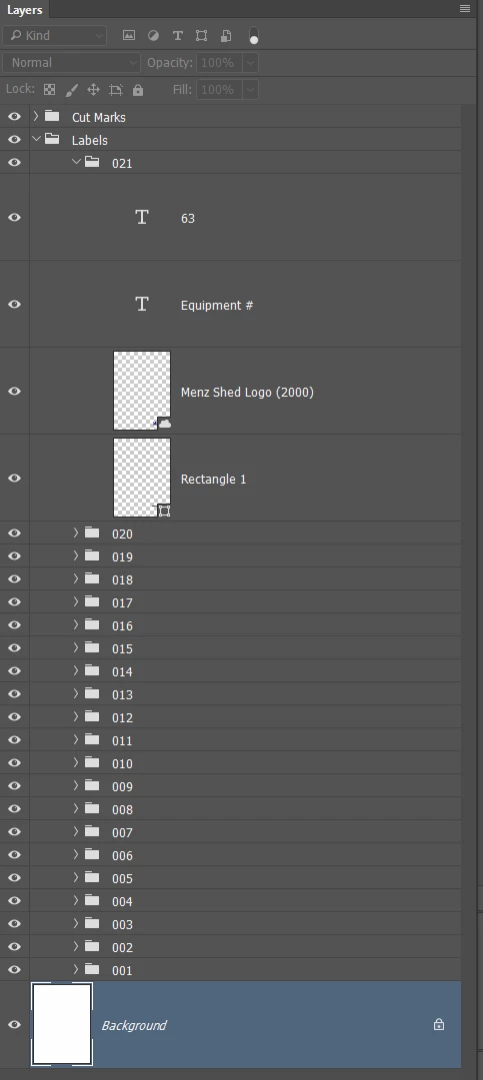
So I was making a page full of labels with incrementing numbers yesterday.  Each label had its own group, and I had 21 on the page.  I needed about 60 of these, so had to change the relevant Type layers, which I stupidly started doing by twirling out the group — my brain woke up later, and I remembered I could use the layer filters to just show Type layers.

Getting to the point, can we twirl open or closed multiple selected groups in one operation?  This was not an issue after I thought to use layer filters because releasing the filter returns you to the original state, but while I was still being stupid, I was thinking there has to be a better way than twirling open, and later closed, 21 groups.
    This topic has been closed for replies.

    2 replies

    Benjamin Root
    Legend
    December 21, 2016

    Yes we can. Ctrl/Cmd click the expand/collapse arrow to expand/collapse all main groups. Alt/Opt click to expand/collapse all sub-groups. Ctrl/Cmd+Alt/Opt click to expand/collapse all main and sub groups.

    Hope that helps!

    davescm
    Community Expert
    Community Expert
    December 21, 2016

    Hi Trevor

    tell me if I've missed the point

    Can you not just highlight all the groups (shift click) then right click on the arrow next to the folder of one of the groups and from the menu click "Open other groups". That only leaves one to open with a direct click

    Dave

    Trevor.Dennis
    Community Expert
    Community Expert
    December 21, 2016

    davescm wrote:

    Hi Trevor

    tell me if I've missed the point

    Can you not just highlight all the groups (shift click) then right click on the arrow next to the folder of one of the groups and from the menu click "Open other groups". That only leaves one to open with a direct click

    Dave

    Hey, that works.  Thanks.

    But only to twirl them open.  Once they are all open, right clicking the arrow gives me this.

    Benjamin's shortcut works via the containing Group, which does the trick, but what if they were not 'sub-groups'?  Easy enough to make them so, I guess.

    davescm
    Community Expert
    Community Expert
    December 21, 2016

    Hi Trevor

    if you highlight them all again you get this :

    Dave