
Known Participant
February 13, 2021
Question

Two questions about line tool

  • February 13, 2021
  • 1 reply
  • 498 views

I'm having two issues with the line tool (while in Shape mode):


1. Changing the stroke doesn't change the appearance of the line, however clicking the gear icon dropdown and editing the "line thickness" under Path options changes the thickness. Why is this the case?


2. After I finish drawing the line, the two selection points on the end are there but clicking away, or switching to another tool makes the line disappear. How do I make the line stay?
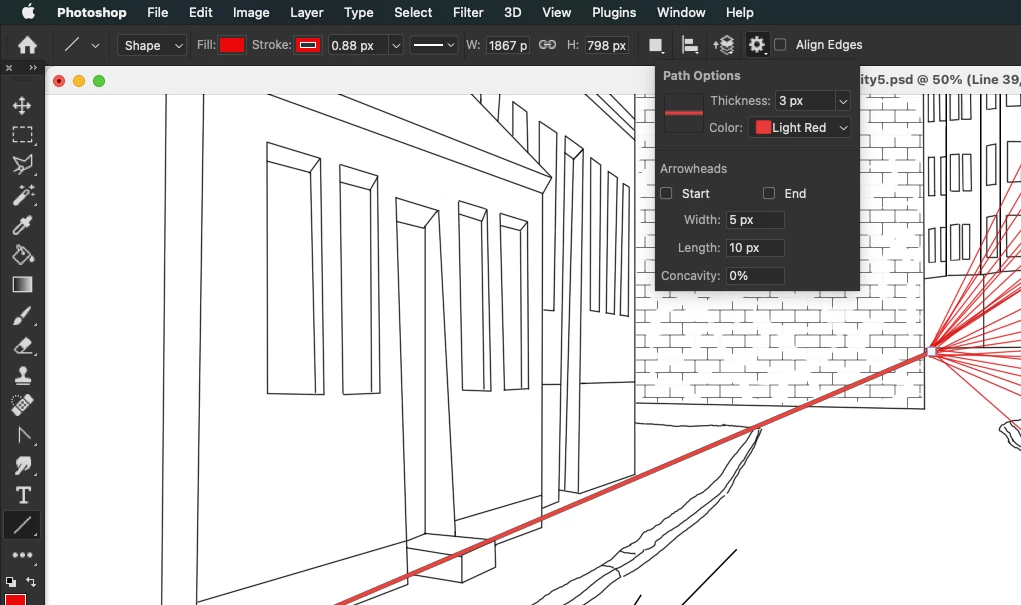


Thanks for your help.


This topic has been closed for replies.

1 reply

davescm
Community Expert
Community Expert
February 13, 2021

The cog wheel settings are changing the thickness of the path which indicates where the line is placed not the thickness of the line itself. You happen to have both set to red so that may cause the confusion.

As far as the shape is concerned make sure the stroke is aligned to centre or outside - If set to inside you will see nothing

Dave


Known Participant
February 15, 2021

Thanks for your help, setting Stroke to center align vs inside align fixes the line width issue for me. However I'm manually having to edit this setting every time I return to this tool, is there a way to make it default?


The line is still disappearing for me after I draw it. If I draw another line, switch to a different tool, or hit Enter, the line I just drew disappears.

c.pfaffenbichler
Community Expert
Community Expert
February 15, 2021

Please post meaningful screenshots including all pertinent Panels. 


Set the Stroke settings to meaningful values before creating any Shape Layer, then they should stick.