Known Participant
June 16, 2024
Question

type mask tool problem

  • June 16, 2024
  • 4 replies
  • 1341 views

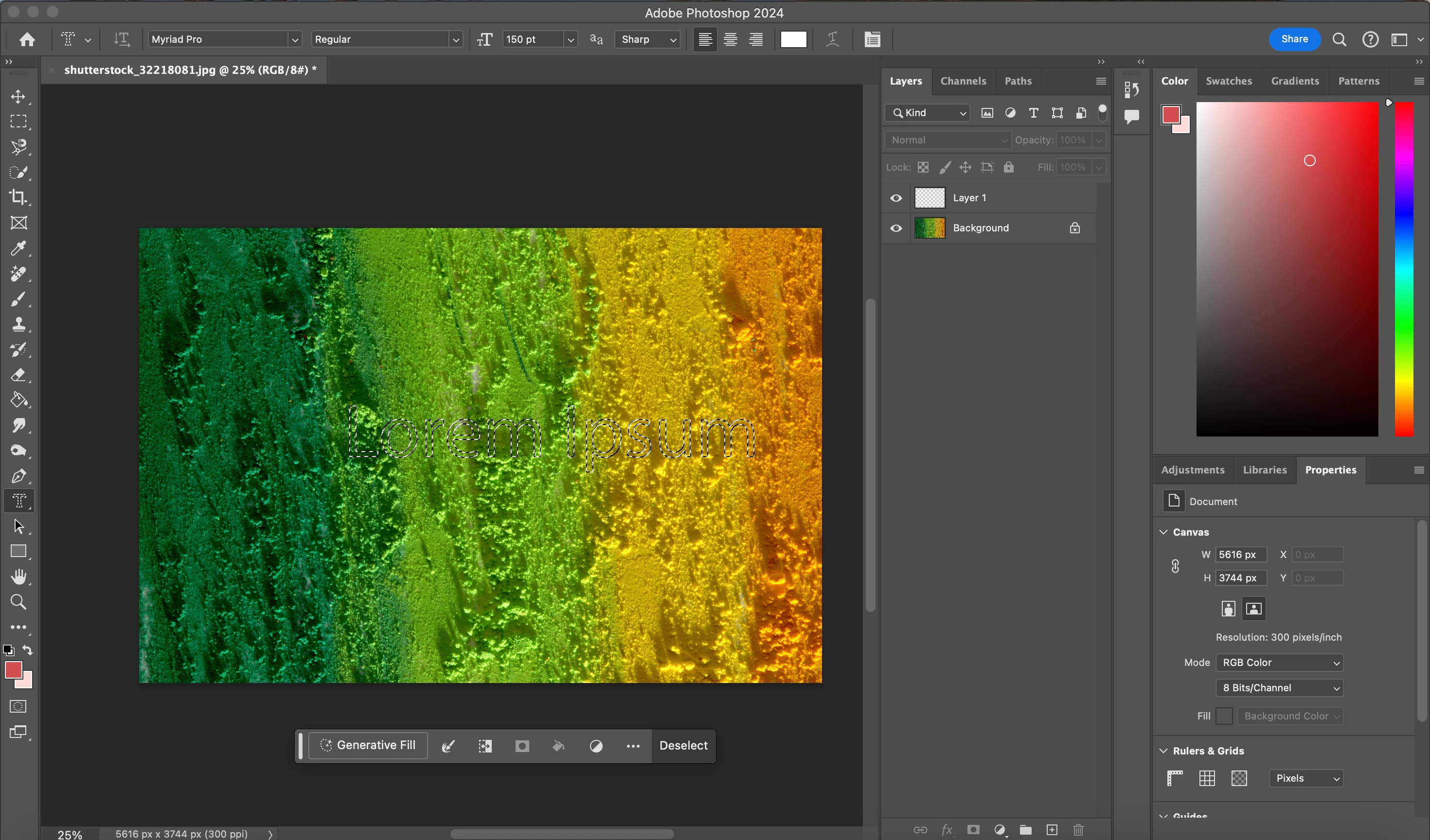
I try to use horizontal or vertical type tool but it turns out like that. According to what my teacher shows to me, i guess it shouldnt happened like it. I cant move the writing. Is it wrong or it is how it should be? I'm really not sure so can someone help me about it please?
    This topic has been closed for replies.

    4 replies

    Jeff Arola
    Community Expert
    Community Expert
    June 16, 2024

    If your using the Horizontal Type Mask Tool it makes a selection as shown in your screenshot.

    Press the Cmd key and should be able to move the text (selection)

    You can use Edit>Fill to fill the selection with color like Black.


    Are you sure your teacher is using The Horizontal Type Mask Tool and not the Horizontal Type Tool?

    The Type Mask Horizontal or Vertical are seldom used anymore.

    y4sem1nAuthor
    Known Participant
    June 17, 2024

    its one of the lessons that shows this part, im sure it's not very used anymore but he wanted to show it anyways i guess. i still can't make it but thanks for your help so much.

    jane-e
    Community Expert
    Community Expert
    June 17, 2024

    @y4sem1n 


    Thank you for this last screenshot. The reason you can't move the text after creating it is that this tool puts pixels on the current layer. It your case, that's the Background layer. It replaces the pixels that were there.


    To use this archaic tool from the early days of Photoshop:

    • Create a new layer
    • Type with the horizontal mask tool
    • Fill the selection with a color
    • You now have pixels on a layer, not live text


    When class is over, never use this tool again. You can even edit your toolbar to hide it, which is what I do. This is how text worked in Photoshop before it had live text. In those days, editing a typo meant delete and retype. Kerning meant select with a Selection tool and use the Move tool. Once we had live text, I never used it again.


    A better way is to use the Type tool to get live text on a new layer. You can always rasterize it to get pixels if you need pixels.


    Jane


    Jeff Arola
    Community Expert
    Community Expert
    June 16, 2024

    If you click and hold on the T in the Tools panel how many choices are shown?

    There should be four as in the screenshot i posted.


    You want the Horizontal Type Tool

    The Horizontal Type Mask Tool is what is selected in your screenshot

    y4sem1nAuthor
    Known Participant
    June 16, 2024

    yes, it is like that. but my problem is, i can't use type mask tool. when my teacher shows how it is supposed to be, mine definitely looks different from his. i cant use it properly. i'm not sure if i cant make it or something's wrong with it. im trying to understand but thanks for it anyways.

    Semaphoric
    Community Expert
    Community Expert
    June 17, 2024

    Without seeing your instructor's screen we can't be sure. When you select the Type Mask tool and start typing, it shows up like a rubylith:

    While it is like this, you can ediit and move it around like a regular Type layer. Once you commit the type by clicking the check mark in the Option Bar, it becomes a selection, and can no longer be edited as Type.

    Jeff Arola
    Community Expert
    Community Expert
    June 16, 2024

    Click and hold on the T in the tools panel and select the Horizontal Type Tool.


    y4sem1nAuthor
    Known Participant
    June 16, 2024

    i can choose and write it but it happens like the picture i post. i cant move my writing and doesent writes as a masking way.

    John T Smith
    Community Expert
    Community Expert
    June 16, 2024

    You need to ask program questions in the forum for the program you are using
    To ask in the forum for your program please start at https://community.adobe.com/
    Moving from Using the Community (which is about the forums) to the correct forum