Participating Frequently
October 26, 2024
Question

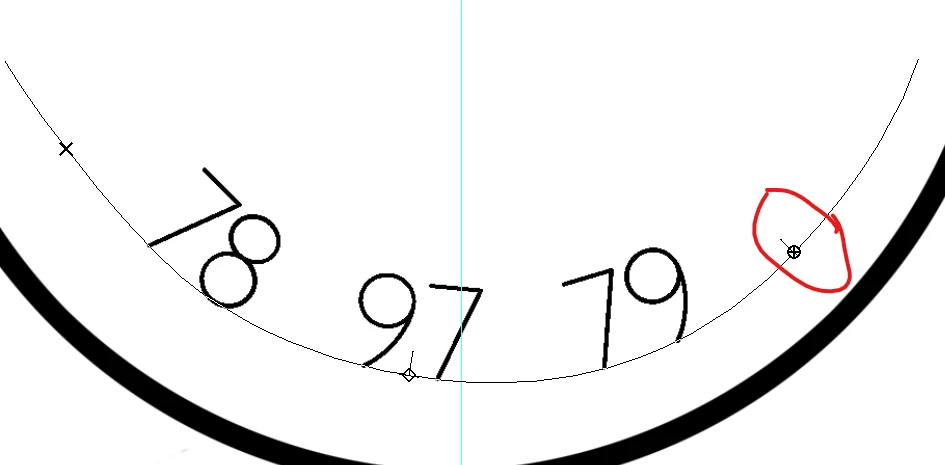
Type on path: End point won't reach end of path
  • October 26, 2024
  • 2 replies
  • 322 views

By reading posts and watching tutorials, I've (at last) figured out what the symbols and mouse icons and behaviours are. However, I can't move the end point any further along the path. My intention is to move the start point a little down (already done in the image) and then move the end point along so all the text appears (the end poing circle has a + because there's more text to display. No matter how I move the mouse, it won't move past that point on the path.


Photoshop 2024

Windows 10

This topic has been closed for replies.

2 replies

Trevor.Dennis
Community Expert
Community Expert
November 16, 2024

As rene has said, adjusting text on a path can be super touchy, and not especially predictable.  As well as using the Direct and Path Selection tools, try adjust type size going small until it all fits, and then fine tune with the Direct Selection tool and increase font size to the max you can get away with.  If you have a swear box, best to hide while doing this or you'll probably fill it to overflowing. 😉

Rene Andritsch
Community Expert
Community Expert
November 15, 2024

Text on path can be hard to adjust sometimes. I tried to replicate your setup and when I use the direct selection tool on the right side of the text I can reveal any overset text.