
Participant
September 8, 2017
Answered

UI for PS Actions

  • September 8, 2017
  • 1 reply
  • 217 views

I have a photo booth, with witch we use Photoshop. We shoot on a green screen, and super impose the customer's choice of backgrounds using actions. I would like to make this more user friendly by having buttons that trigger the actions associated with each of the different backgrounds. Any ideas?
This topic has been closed for replies.
Correct answer Jeff Arola

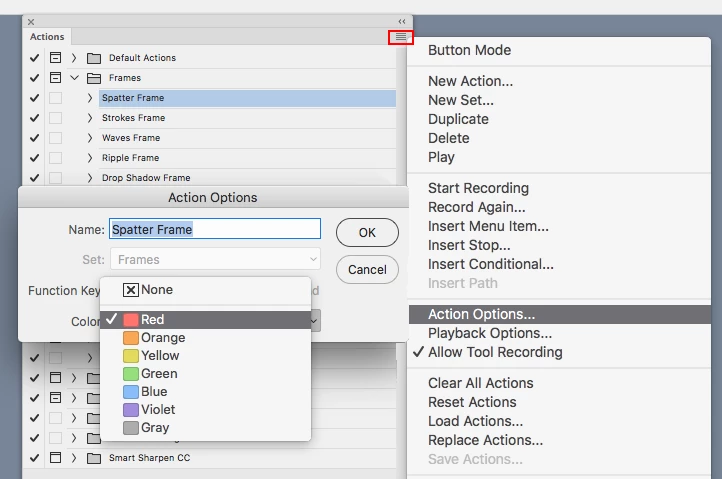
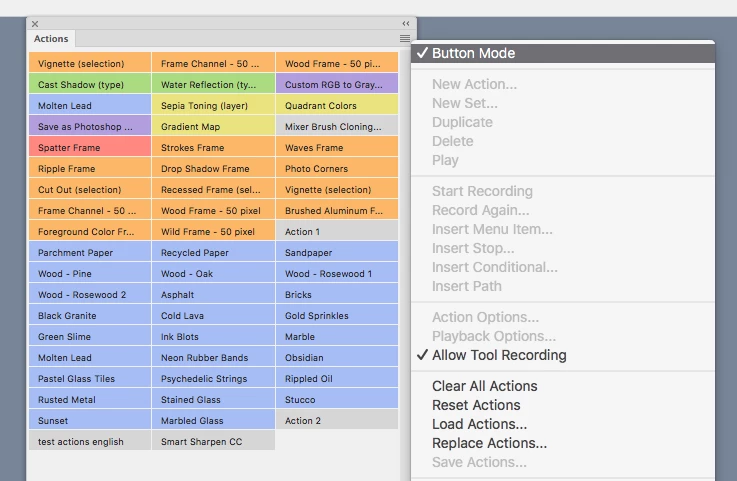
You can put the actions panel in Button Mode and assign different colors to the buttons.

First click on the action  and go to Action Options where you can set the color.

Repeat for each action.

Then click on Button Mode.

1 reply

Jeff Arola
Community Expert
Jeff ArolaCommunity ExpertCorrect answer
Community Expert
September 8, 2017

You can put the actions panel in Button Mode and assign different colors to the buttons.

First click on the action  and go to Action Options where you can set the color.

Repeat for each action.

Then click on Button Mode.