Participant
October 24, 2017
Question

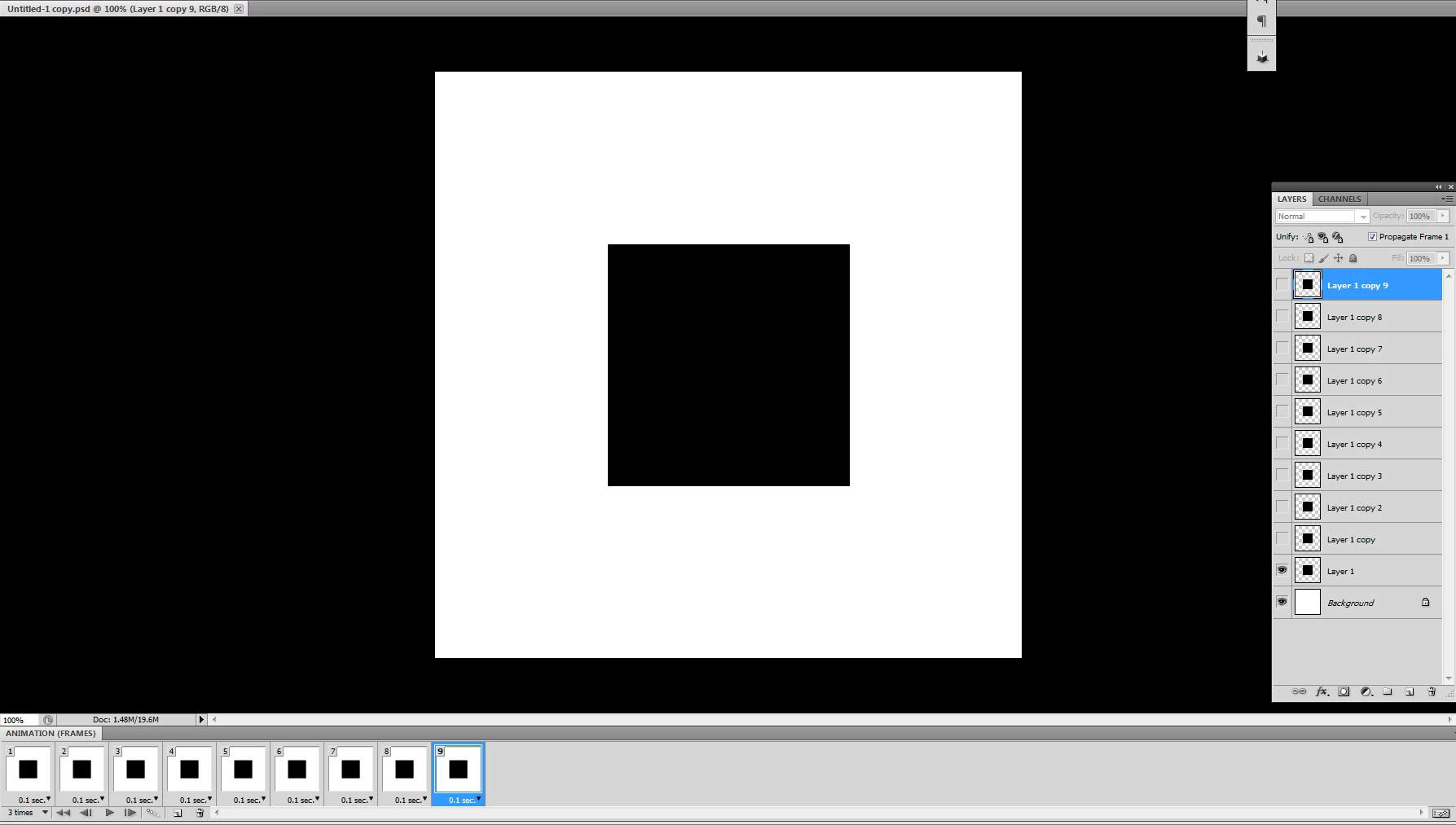
Unable to become animation when playing gif play in Photoshop

  • October 24, 2017
  • 1 reply
  • 317 views

In chrome and the viewer, gif's animations are played well.

But when running gif on photoshop, it is fixed by the same layer and is not animated.

what's the problem?
This topic has been closed for replies.

1 reply

JJMack
Community Expert
Community Expert
October 24, 2017

You do not play Gif in Photoshop. You Play Frame anymation. In your Frame Animation  panel it look like all your frame thumbnails ware the same. Nothing looks like its changing in your frame animation.

JJMack
uhmjiAuthor
Participant
October 24, 2017

Thank you for your prompt reply.

But what I'm saying is that if I press space bar to play animation, Not only does it animate thumbnail but also workspace.

The layers of the frame are united in one layer. so animation is freeze.

Is there any solution?

JJMack
Community Expert
Community Expert
October 24, 2017

The space bar Play the animation??? Have you tried clicking on the Play icon in the bottom of the frame animation timeline. I tried the space bar in my Windows 10 CC 2018 and it does play the animation.  I did not  know that was and option. Space to me was always the hand tool

JJMack
