
Unable to create an action for Auto Curves (Find Dark & Light...)
Hello there 🙂
I have an issue regarding a recording of an action using auto-curves adjustment layers.
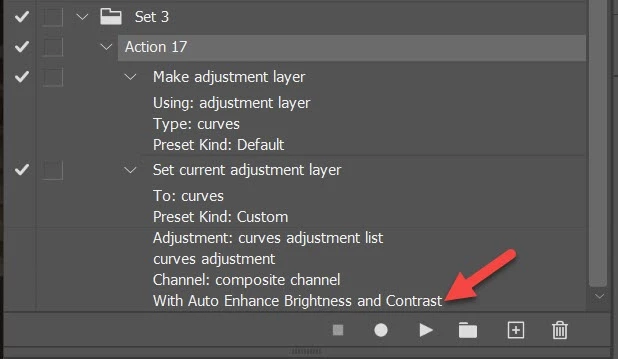
I'm trying to create an action including the "Auto Curves Find Dark & Light Colors + Snap Neutral Midtones".
Issue is, it's recording the final value from the auto setting, hence not re-analyzing the new picture for new automatic settings.
For example, if recording on the blue-shifted photo, I record the action by simply creating a Curves Adjustment Layer, clicking the Automatic button (same result whether modifying the auto setting behavior during recording or not), this auto-adjust shifts the picture to a more yellow tonality, I then stop the recording of the action.
When using that action on a yellow-shifted photo, the action makes it even more yellow.
Am I using it wrong ? Or is it just not possible to record the auto-setting ?
Thanks ❤️
(Up-to-date Photoshop as of 07 April 24, on Windows 11 Family)
 AdChoices