
Participant
June 1, 2024
Answered

Unable to Save PSD Directly as WebP in Photoshop 25.6.0

  • June 1, 2024
  • 2 replies
  • 852 views

Dear Adobe Support,


I am currently using Adobe Photoshop version 25.6.0, and I am unable to save my PSD files directly as WebP. Despite having the latest version, the option to save as WebP only appears when I open JPEG files and not when I work with PSD files.

Here are the details of the issue:

  1. When I open a JPEG file and go to "File" > "Save As", the WebP option appears in the dropdown menu.
  2. However, when I open a PSD file and go to "File" > "Save As", the WebP option does not appear anywhere in the dropdown menu.
This topic has been closed for replies.
Correct answer Ged_Traynor

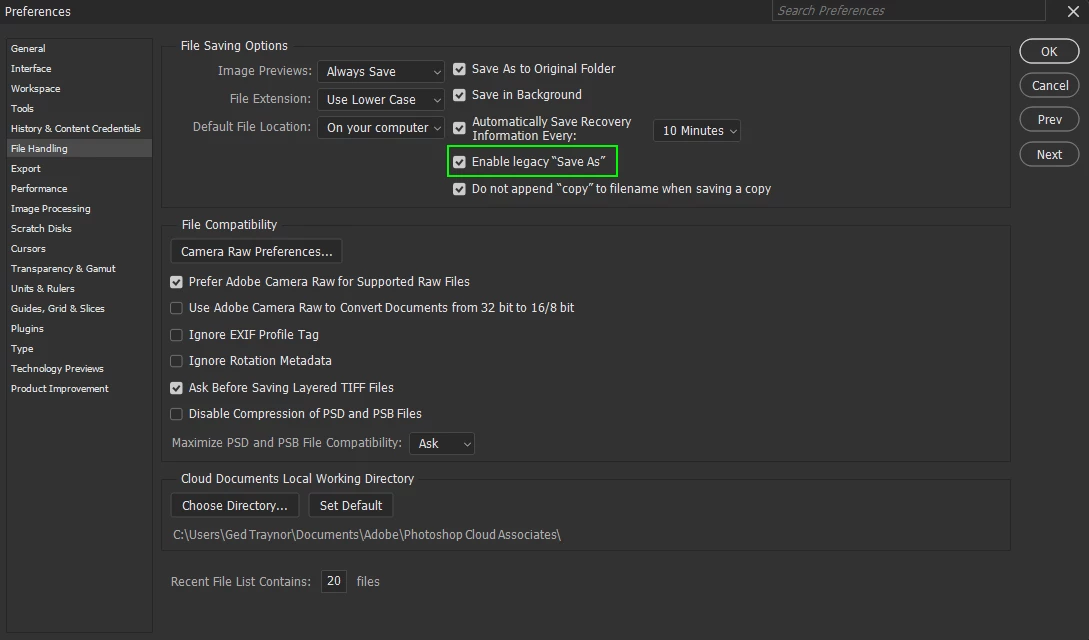
@CédricB82A you can also enable legacy save as in preferences, 25.9 is the most recent version of Photoshop

2 replies

Ged_Traynor
Community Expert
Ged_TraynorCommunity ExpertCorrect answer
Community Expert
June 1, 2024

@CédricB82A you can also enable legacy save as in preferences, 25.9 is the most recent version of Photoshop

Stephen Marsh
Community Expert
Community Expert
June 1, 2024

You need to Save a Copy.

Participant
June 3, 2024

Hello, I gave the exact same issue, and I already tried to save as copy, but still the option to save as Webp format is no longer available ! 

Stephen Marsh
Community Expert
Community Expert
June 3, 2024

@VEDRINE286329895tca 


Then check the document colour mode and or bit depth, what are they?