


May 7, 2020
Question

Unable to Sync Between Desktop and Mobile Photoshop Versions

  • May 7, 2020
  • 2 replies
  • 4538 views

I hope someone can help.
I am not able to sync between Photoshop 2020 (used on my Windows 10 PC)

and the Photoshop for iPad that is included in my subscription.
As you can see from this photo, files will not sync in the Cloud.
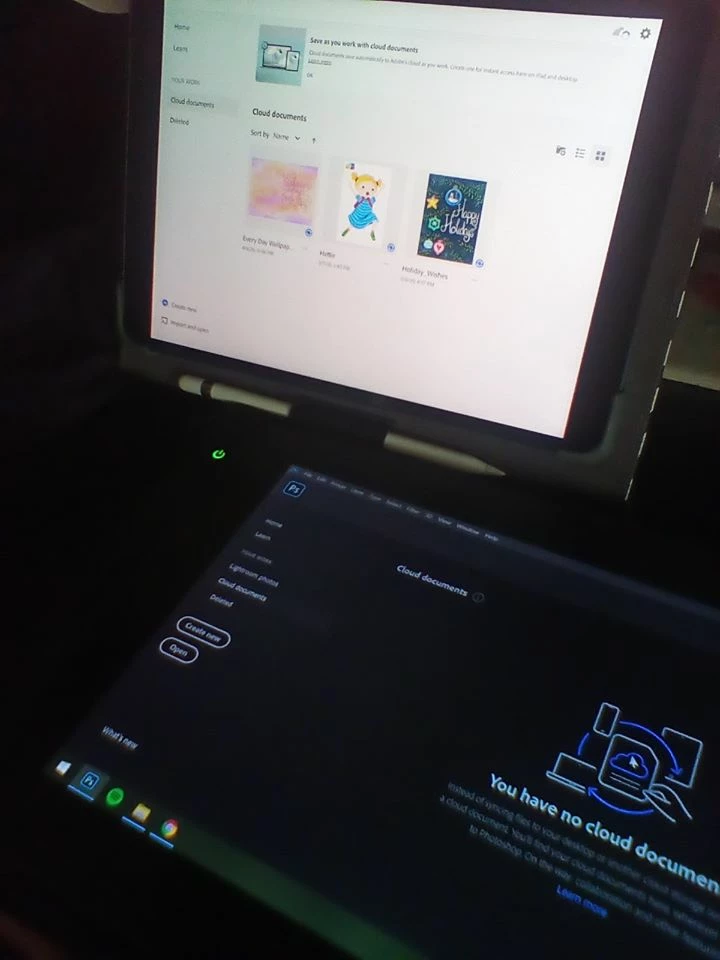


On my iPad version I get an error message of "Something is preventing syncing"...on my pc I have gone into my syncing settings and paused then restarted...to no avail.

Is this an issue for anyone else? Has anyone had this issue and resolved it?


Thanks.

This topic has been closed for replies.

2 replies

JJMack
Community Expert
Community Expert
May 9, 2020

I have never used Cloud storage with Photoshop on my PC.   I did  install  iPad Photoshop and Fresco and signed into them with my creative cloud user ID and took the Interactive tours for both.  I'm holding off using their current versions too much is missing.  However, now on my PC windows system I do see the interactive tour document are in my Creative Cloud Documents. Are you sure you singed in with your creative cloud user id. Saving files seems to be to the cloud and can take time depending on Internet connection.   You do need to be connected to be on the web the use the iPad apps.

JJMack
Participant
May 8, 2021

same problem here, since a few days. "Something is preventing syncing.... " if the program would say what is prventing from syncing i could look in to it. Now i don't have a clou .... any one ? 

JJMack
Community Expert
Community Expert
May 8, 2021

I do not use the could storage so I have set it not to sync I set pause sync.  I did try iPad Photoshop so I did use some.  Use the creative cloud desktop application and check your settings.

JJMack
Akash Sharma
Legend
May 8, 2020

Hi there,


Sorry that Cloud documents are not sycing between your desktop and iPad. 


Would you mind checking the troubleshooting steps mentioned in the linked section of this article https://helpx.adobe.com/photoshop/kb/cloud-document-error-troubleshooting.html#syncingFailed and let us know if that helps?


Thanks,

Akash

May 9, 2020

Thank you, Akash.
I have tried the troubleshooting suggestions on the link you have provided and the issue still remains.

I am unable to sync between Ps for iPad and Ps on desktop.

Participant
June 29, 2020

I'm having exactly the same issue on iPad. None of those troubleshooting tips apply or work.


Any other suggestions? This is breaking my workflow.