
Answered
This topic has been closed for replies.
Hi there,
Thanks for reaching out. We're sorry for the trouble with this. We're here to help.
Please follow these steps
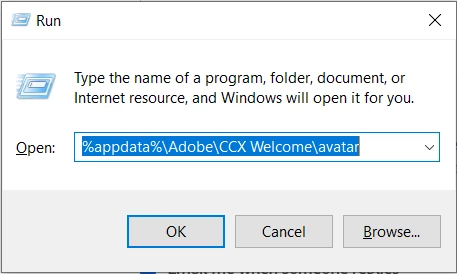
- Close Photoshop.
- Press the Windows > Enter 'Run' > Type %appdata%\Adobe\CCX Welcome\avatar > hit OK
- Windows 10/11: Users/[user name]/AppData/Roaming/Adobe/CCWelcome/avatar
- Rename the Assets folder by adding a .old at the end. (assets > Rename > assets.old)

- Restart Photoshop.
Let us know how it goes from here.
Thanks!
Sameer K
Sign up
Already have an account? Login
To post, reply, or follow discussions, please sign in with your Adobe ID.
Sign inSign in to Adobe Community
To post, reply, or follow discussions, please sign in with your Adobe ID.
Sign inEnter your E-mail address. We'll send you an e-mail with instructions to reset your password.
