
Participating Frequently
February 2, 2017
Answered

Unable to use rectangular marquee tool in CS4

  • February 2, 2017
  • 1 reply
  • 652 views

system: windows 7, CS4

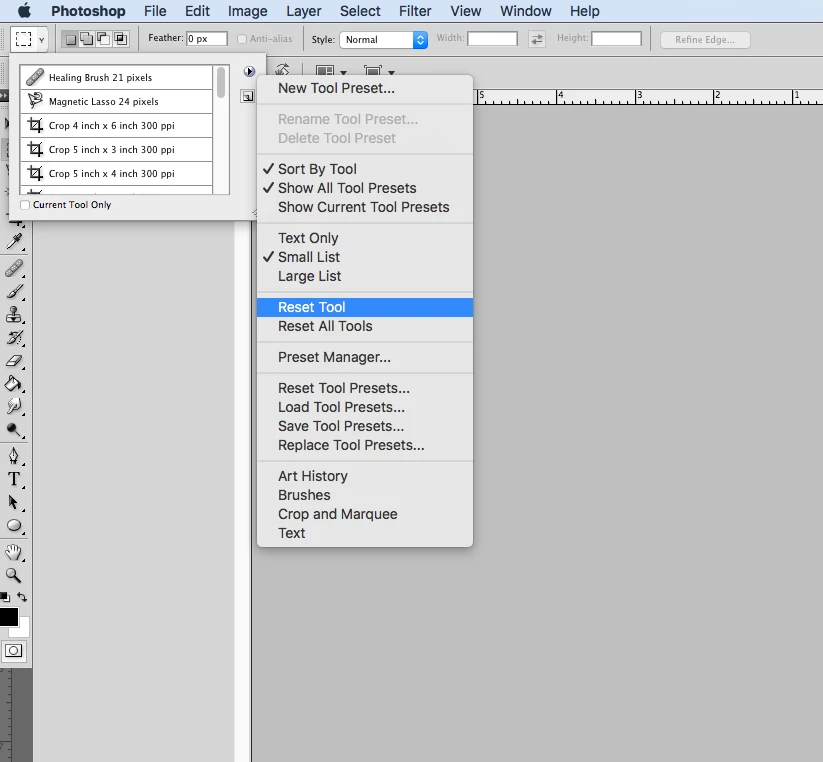
When I have an image opened in cs4 and I use the rectangular marquee tool to capture the image the dotted line area will not cover the entire image I want to edit, hence I can capture on a portion of the image. Does the marquee tool need to be reset? if so How can I only reset the marquee tool as the other applications and tools are working fine.
    This topic has been closed for replies.
    Correct answer Simmer1

    Hi Marks7128949,

    It does sound like the Marquee Tool needs to be reset. You can do this by right clicking on the arrow beside the Marquee Tool in the top left corner then select Reset Tool from the dropdown menu.

    Thanks,

    Sim

    1 reply

    Simmer1
    Community Expert
    Simmer1Community ExpertCorrect answer
    Community Expert
    February 2, 2017

    Hi Marks7128949,

    It does sound like the Marquee Tool needs to be reset. You can do this by right clicking on the arrow beside the Marquee Tool in the top left corner then select Reset Tool from the dropdown menu.

    Thanks,

    Sim

    Participating Frequently
    February 2, 2017

    Thank you for your help. Worked for me.