alexandred28031804
Participant
August 25, 2024
Answered

UNLINNK/UNNLOCK LAYER EASILY

  • August 25, 2024
  • 1 reply
  • 142 views

Quand  tu  as des  tonnes de dossiers de calques, que  tu as  vérouillé et/ou linké pour ne pas commettre de fausses manoeuvres, mais quans tu as besoin de tout  dévérouiller pour une raison x ou y, c'est un enfer !!! Il faut dérouler les dossiers de calques un par un et les délocker un par un et c'est  très  très long :  il faudrait un moyen rapide  et pratique d'isoler tous  les calques  vérouillés/liés ! 48 mn pour faire ça, c'est bien trop long ! 
This topic has been closed for replies.
Correct answer Jeff Arola

You can use the Layer Filter feature to find all the Linked and/or Locked layers

https://www.youtube.com/watch?v=iVQdEB2IPWM


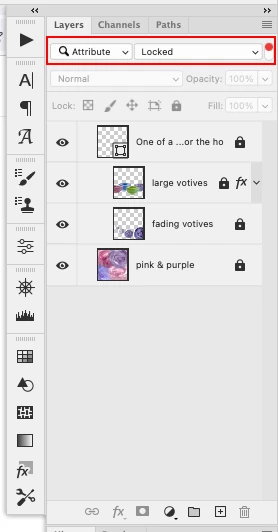
For example, in your case you would select Attribute from the Filter Layers by Type drop-down then Linked or Locked from the drop-down menu that appears to the right.

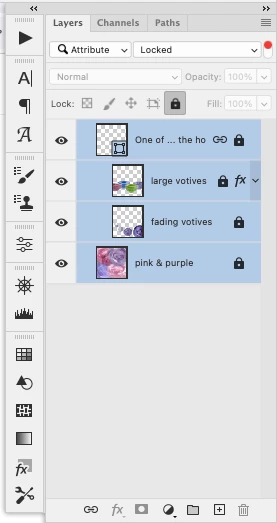
Then go to Layer>Select All Layers and you can click on the Lock icon to unlock all the selected layers


1 reply

Jeff Arola
Community Expert
Jeff ArolaCommunity ExpertCorrect answer
Community Expert
August 25, 2024

You can use the Layer Filter feature to find all the Linked and/or Locked layers

https://www.youtube.com/watch?v=iVQdEB2IPWM


For example, in your case you would select Attribute from the Filter Layers by Type drop-down then Linked or Locked from the drop-down menu that appears to the right.

Then go to Layer>Select All Layers and you can click on the Lock icon to unlock all the selected layers