Participant
October 30, 2018
Answered

Unsaved Asterisk doesn't vanish even if the document is saved (PS CC 2019)

  • October 30, 2018
  • 2 replies
  • 1855 views

Since the update, it seemingly randomly appears that - even after saving the file - Photoshop assumes the document being unsaved. It shows the unsaved asterisk in the tab and prompts me with a "Do you want to save?" dialogue when closing.

It doesn't happen every time with every document, though. I wasn't able to find any consistency or pattern in the occurence yet. Did anyone else encounter that issue yet?

It's not much of a deal, but jumping back and forth between Photoshop and InDesign, I end up getting confused if I may indeed have some unsaved changes and it slows down the workflow a bit.

Best wishes,

foofaraw
    This topic has been closed for replies.
    Correct answer Brainbug

    Copied over from here:

    Link

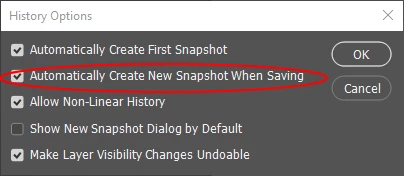
    UPDATE: I found the cause. The option "Automatically Create New Snapshot When Saving" is broken. When this is activated, it does NOT save a new snapshot. Instead the asterisk stays on the label.

    Only the first snapshot is made, all subsequent snapshots are not created and this is the reason, why the file is still marked as "not saved"

    2 replies

    Brainbug
    BrainbugCorrect answer
    Inspiring
    November 29, 2018

    Copied over from here:

    Link

    UPDATE: I found the cause. The option "Automatically Create New Snapshot When Saving" is broken. When this is activated, it does NOT save a new snapshot. Instead the asterisk stays on the label.

    Only the first snapshot is made, all subsequent snapshots are not created and this is the reason, why the file is still marked as "not saved"

    JJMack
    Community Expert
    Community Expert
    November 29, 2018

    As soon as you make a change to an open document the * will appear it means the document has unsaved changes.  It does not mean it has never been saved.  Save It the *  will be remove the document will still be open make a change the * will be back.

    My Open document event will add garbage into the info metadata field if it  is not there.  I often see * when I open old files.  I do not care if garbage gets written to disk on not I just add it to avoid and Adobe scripting bug they added in cc 2015.5 by design.

    JJMack
    Brainbug
    Inspiring
    November 29, 2018

    JJMack  wrote

    As soon as you make a change to an open document the * will appear it means the document has unsaved changes.  It does not mean it has never been saved.  Save It the *  will be remove the document will still be open make a change the * will be back.

    My Open document event will add garbage into the info metadata field if it  is not there.  I often see * when I open old files.  I do not care if garbage gets written to disk on not I just add it to avoid and Adobe scripting bug they added in cc 2015.5 by design.

    True.

    But in the CC 2019 Version of Photoshop, the * is still present immediately after saving If the "Automatically Create New Snapshot When Saving" option is activated. Normally, the * goes away after a save. The snapshot function in the current version of Photoshop is broken and does not create another snapshot after the first one, resulting in the * staying even after a save. That means, it will stay there even if NO changes were made after a save. This is reproducable. By switching off the  "Automatically Create New Snapshot When Saving"-Option, the * will disappear after each save operation. This needs to be fixed..

    JJMack
    Community Expert
    Community Expert
    October 30, 2018

    Can you give the exact step you used that produces the error.   For example when you are working on a new layerd document and save out a Jpeg file.  You have not saved the new layered document you working on.  You save out a jpeg file using content in your layered new unsaved document. 

    JJMack
    FoofarawrAuthor
    Participant
    October 30, 2018

    Okay, so I did a quick test.

    1. Created a new 1920x1080 file

    2. Added a layer, did a few brush strokes on it

    3. Saved it as a tif file on my desktop (Asterisk was gone, file was recognized as saved properly)

    4. Added another layer, did another brush stroke on it

    5. Saved it with Ctrl+S (Asterisk stays, file isn't recognized as saved)

    Could reproduce the situation while saving as PSD as well. Hm.

    I also just realized that the protocol snapshots won't work in that case either. Photoshop only produces one snapshot, which is the most recent one. All other saves inbetween don't appear anymore / vanish.

    War Unicorn
    Community Expert
    Community Expert
    October 30, 2018

    I tried repro'ing but cannot seem to do so. Does Photoshop actually go through the process of saving the file? You should see something happening, however brief.