Resuelto
Update messing with my workflow
It seems every time after an update I have to setup from scratch and make a study of where functions went. Is there a way to create a workflow without it being disrupted by an update?
It seems every time after an update I have to setup from scratch and make a study of where functions went. Is there a way to create a workflow without it being disrupted by an update?
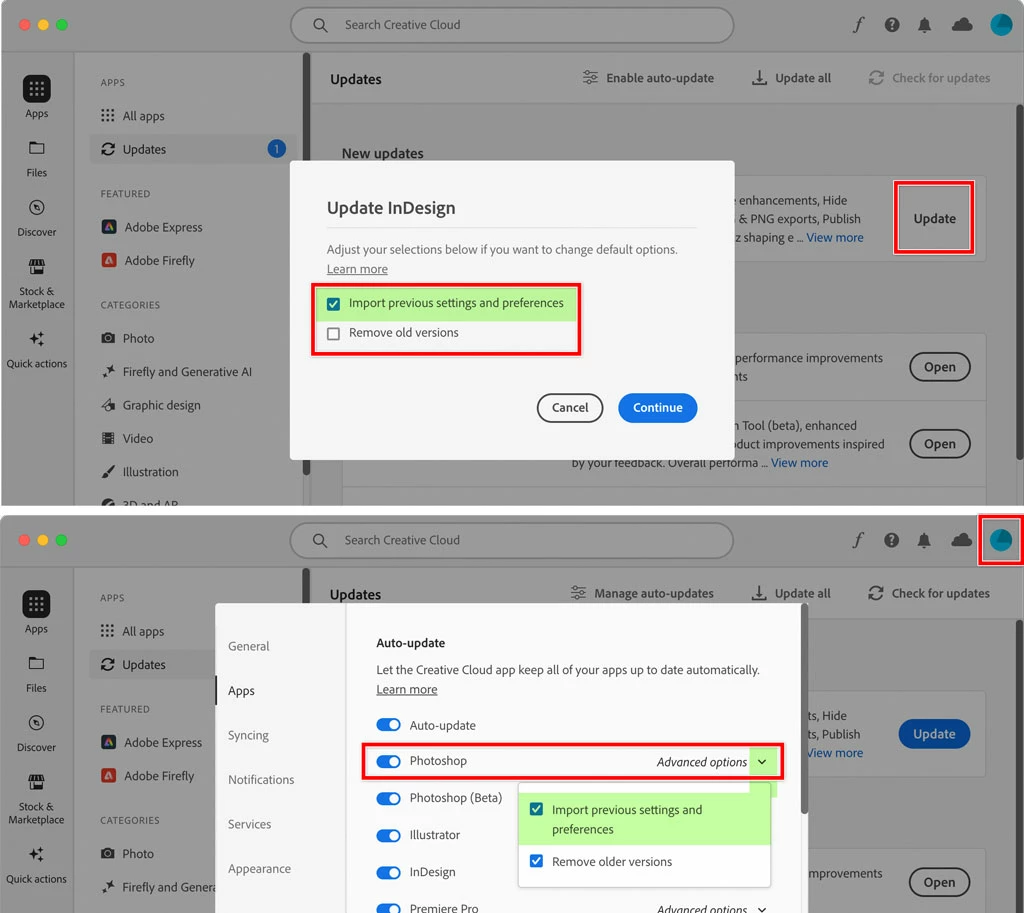
You should not have to start over with every update. If you are, it’s possible that the Creative Cloud desktop app is being allowed to reset things. Make sure it is set to Import Previous Settings and Preferences, because if that option is disabled, it will wipe them for the version upgrade.
In the picture below, the top example is for a manual update (clicking the Update button for each app), and the bottom example is if you enabled Auto-Update in the Creative Cloud desktop app settings for Apps.
Also, if your panels are getting reset, save your preferred arrangement as a workspace so that you can restore it at any time. Arrange your panels and choose Window > Workspace > New Workspace, and after you name it, you can choose your workspace from that same Workspace submenu.
Enter your E-mail address. We'll send you an e-mail with instructions to reset your password.
 AdChoices