
KE_DP
Inspiring
May 3, 2019
Answered

Updated to CC - faded look while pixel level editing

  • May 3, 2019
  • 2 replies
  • 931 views

I've been using CS5 for years but decided to make the plunge.  Something I don't care for is the loss of contrast and color when zooming way in to edit on the pixel level.  See the difference in this sample.   Is there a setting to make this work like CS5?  I don't mind the "squares" - that's fine - but the faded look is difficult to work with.  Larger size HERE -

CS5 = LH -

CC = RH -
    This topic has been closed for replies.
    Correct answer

    Hi

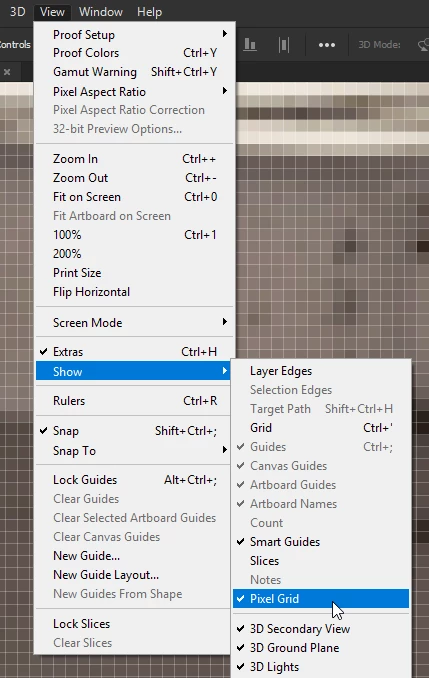
    You can turn off the Pixel Grid from here

    2 replies

    D Fosse
    Community Expert
    Community Expert
    May 3, 2019

    The CC version has been upsampled, ​the safest way to ruin an image. The typical upsampling artifacts are clearly visible.

    JJMack
    Community Expert
    Community Expert
    May 3, 2019

    It hard to see differences when you post two different size images the is no good way to see differences unless the differences are grossly different.

    In you large image one even has the pixel grid showing

    JJMack
    KE_DP
    KE_DPAuthor
    Inspiring
    May 3, 2019

    Thanks - sorry the upload capability here of 900px isn't ideal for this kind of thing.

    Here's a link to an online file a little larger with a close match - https://www.karenengelphotography.com/img/s/v-10/p3400111498-6.jpg

    This compares CS5 and CC side by side at the same viewing zoom level.

    The pupil for instance is pure black in CS5 no matter how far in I zoom.   In CC it becomes fuzzy gray.  This might be because CC shows gray pixel borders where CS5 doesn't ever show those borders within a solid color at any zoom level.

    I suppose the argument can be that pixels are square.  If there's a way to turn off the light gray grid appearance of them I might prefer it...  Are there actually micro gray borders on all digital image pixels?  in CC they do not appear until one goes to 800%+ viewing.

    Correct answer
    May 3, 2019

    Hi

    You can turn off the Pixel Grid from here