
Updating to 22.5.1 Options for Drawing Mode in Advanced Graphics Processor Settings has disappeared
Where are my options for Drawing Mode in Advanced Graphics Processor Settings?
This is all I have (pic below).
It wasn't like this prior to PS 22.5.1 update. I don't have the option of Basic, Normal or Advanced. I know the options were there before the last update because I had changed it.
I have Windows 10 OS up to date.
NVIDIA GeForce GTX 970 up to date.
Also attached, System Info
This PS is so buggy. The Memory Ram allocated by PS is wrong, bug reported and waiting a fix. Transform Handles are sticky, bug reported and waiting a fix, now this.
Please don't tell me to reset preferences etc, as all this was done when reporting Sticky Transform Handles which Adobe now recognises as a bug.
I don't have this issue in Photoshop v 21.2.12. Is it a bug?? 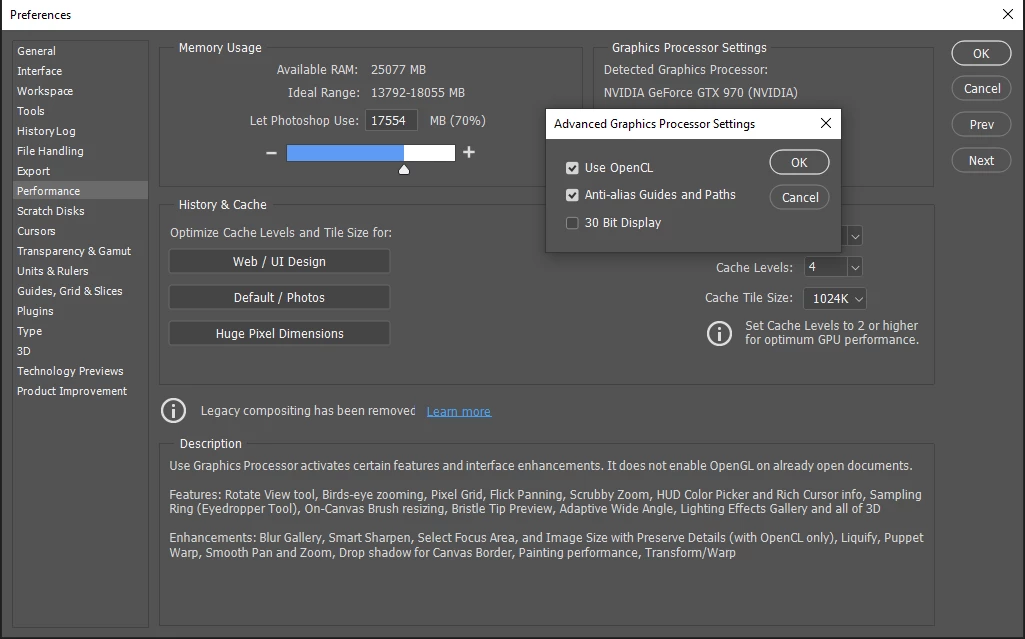
 AdChoices