
Participant
August 20, 2018
Answered

Urdu typing glitch in cs6

  • August 20, 2018
  • 1 reply
  • 662 views

good morning guys..

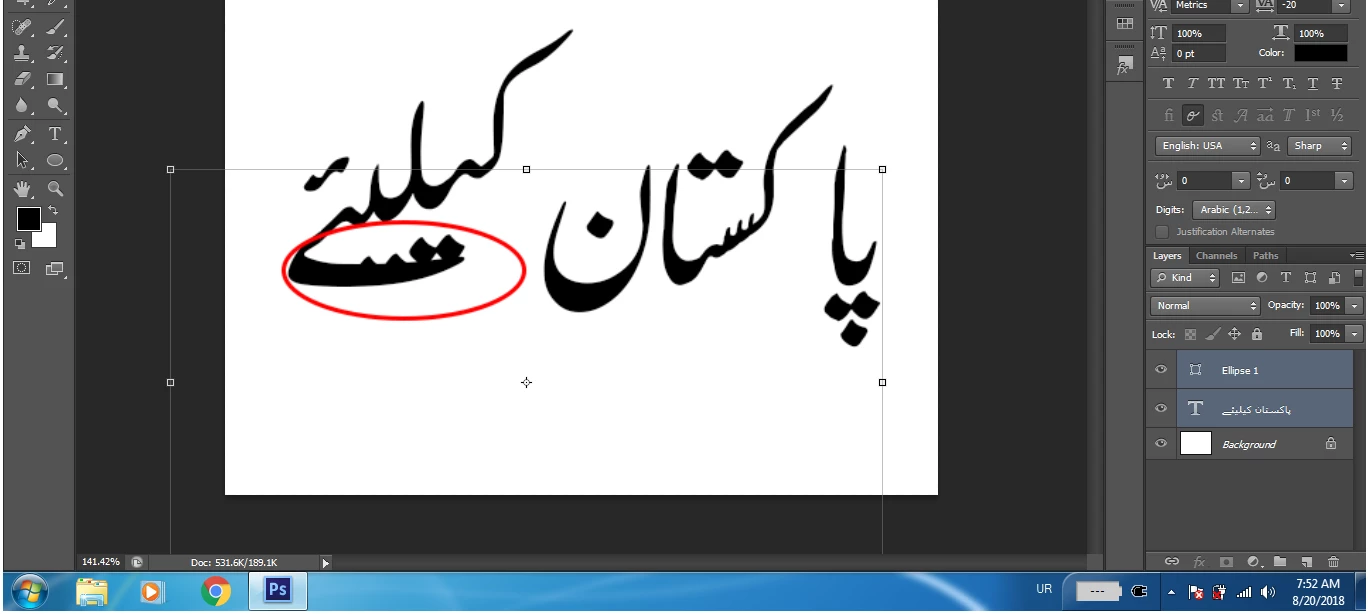
guys i need some help finding out what exactly is going wrong within photoshop..typing Urdu in Photoshop cs6 is a great experience and i enjoy making party flex, designs, poetry etc.but recently a glitch/bug came out, as the dots aren't there where they should be as you can see in the picture below, and guess what, the problem is only with the word circled in the pic, and sometimes undo shortcut Ctrl+z also doesn't respond and i have to press it again or i have to press Alt key too..

tried reinstalling, deleting font and installing again but nothing..any help ?

sorry for my bad english.
    This topic has been closed for replies.
    Correct answer Mohit Goyal

    Hi ummef,

    We're really sorry for all the hassle. Could you please let us know the exact version of Photoshop CS6 you are using now on your machine? Go to Photoshop > help menu > system info.

    Since, how long you are facing this issue in Photoshop? Have you tried trashing & rebuilding the Photoshop preferences? If not, then please try it and let us know if that helps.

    To know more about resetting Photoshop preferences, please refer the following link: Preferences in Photoshop

    Also, please refer the below video tutorial and check your workflow in Photoshop.

    How to Write Urdu in Adobe Photoshop CS6 Without Inpage - YouTube

    Regards,

    Mohit

    1 reply

    Mohit Goyal
    Community Manager
    Mohit GoyalCommunity ManagerCorrect answer
    Community Manager
    September 25, 2018

    Hi ummef,

    We're really sorry for all the hassle. Could you please let us know the exact version of Photoshop CS6 you are using now on your machine? Go to Photoshop > help menu > system info.

    Since, how long you are facing this issue in Photoshop? Have you tried trashing & rebuilding the Photoshop preferences? If not, then please try it and let us know if that helps.

    To know more about resetting Photoshop preferences, please refer the following link: Preferences in Photoshop

    Also, please refer the below video tutorial and check your workflow in Photoshop.

    How to Write Urdu in Adobe Photoshop CS6 Without Inpage - YouTube

    Regards,

    Mohit