
Participant
May 25, 2020
Question

Usage of Eyedropper in 2020

  • May 25, 2020
  • 1 reply
  • 552 views

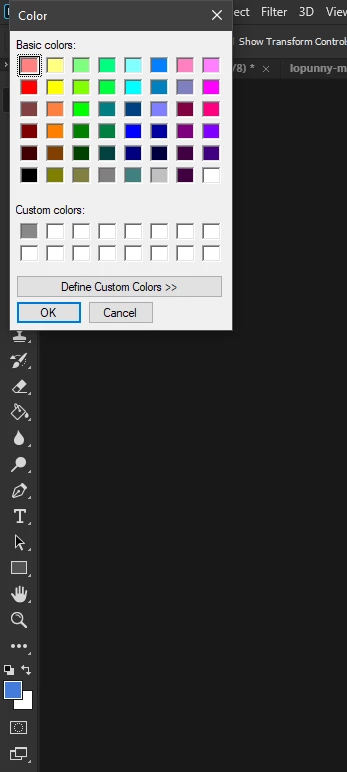
I have always been a big fan of Photoshop, having used it for many years, and with this latest update, I can immediately notice some differences I hope can be changed in settings. The most major one being the eye dropper usage while in the color selector, beforehand you were able to click on a pixel of your image and it would use the eyedropper tool to make that your currently selected color. Now, the color selector is nothing like that, and frankly, a big downgrade to its previous usage in my opinion. Below I have provided a screenshot of the new "Color Selection" which I'd more than love to have changed to the older version (that utilizes the eyedropper).
 

This topic has been closed for replies.

1 reply

c.pfaffenbichler
Community Expert
Community Expert
May 25, 2020

You mean the Color Panel? 

What is it set to? 

maddoxzAuthor
Participant
May 25, 2020

Yours is the exact way I want it, or atleast the Mac equivalent, that's how it was originally on my older version of Photoshop, with the ability to click on the project to use the eyedropper. And by the color tool, I mean this on the Side toolbar icon.


maddoxzAuthor
Participant
May 25, 2020

Followup: This is how Photoshop originally had the color selection tool for me when you would click on a part of your project, it would set the color of that pixel, to the selected color.