Participant
April 30, 2021
Question

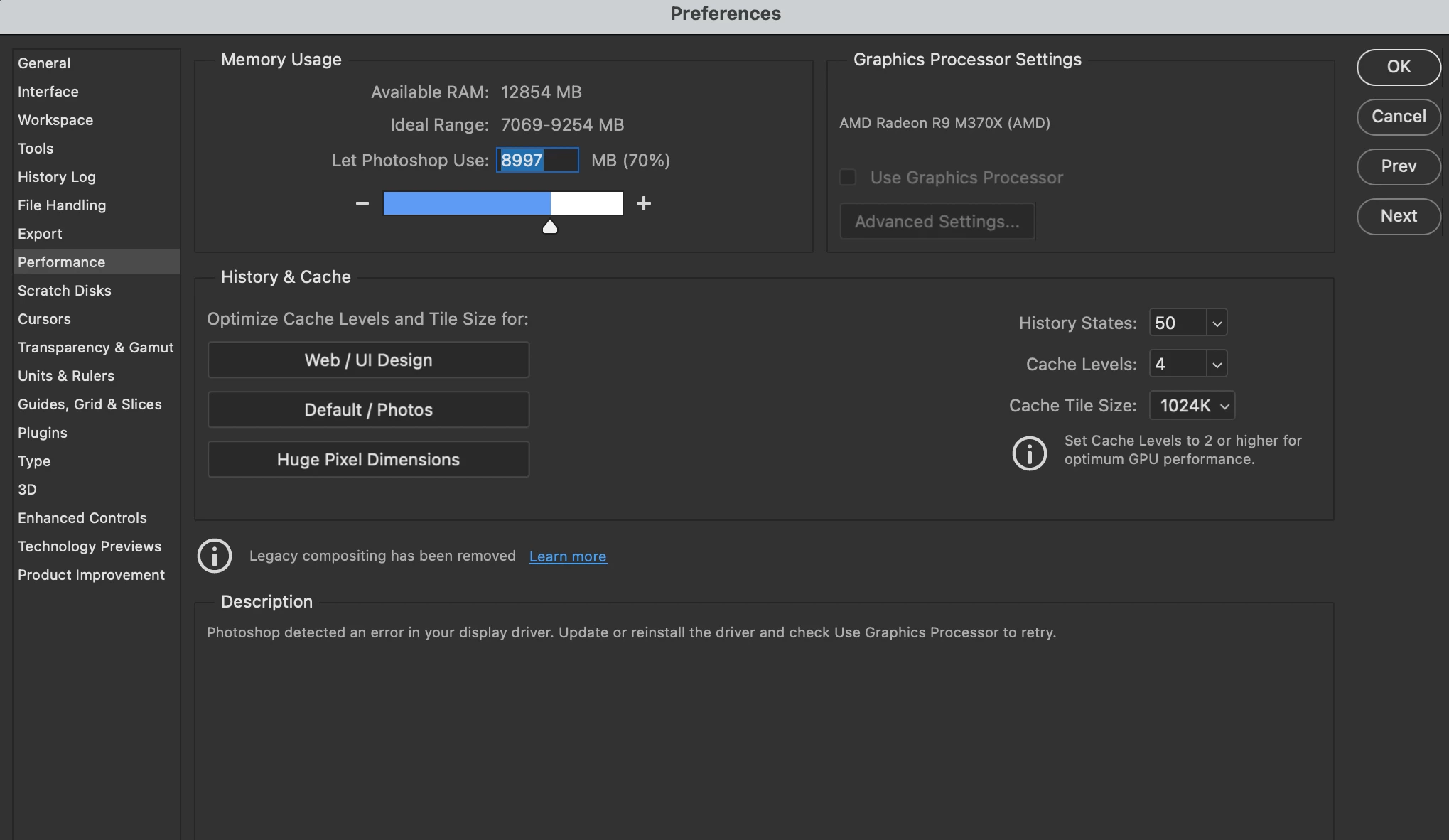
Use Graphics Processor Disabled on Mac OS Big Sur

  • April 30, 2021
  • 1 reply
  • 598 views

I am experiencing terrible performance with zoom and scroll while editing photos, and I noticed that "Use Graphics Processor" was disabled and giving me an error about needing the appropriate driver for my graphics card. But I am using a Mac so these are built in and I have no way of updating them. Does anyone know how to fix this? Photoshop 22.3.1 on MacOS 11.3


Thanks!
 

This topic has been closed for replies.

1 reply

Known Participant
April 30, 2021

Download en earlier version, This careless act had been widely reported and there is no known workaround. Removing sniffer will not work for all and even if it works, it will revert to this after sometime. 


Save yourselfsometime please, don't do anthing else. 

Erik5E99Author
Participant
April 30, 2021

Ouch; the only older available option from the CC is 21.2.7 - do we know if this still works in this version? How long has this been going on and has there been any acknowledgement from Adobe on a fix?

Known Participant
April 30, 2021

Version 22.3 works