Answered
Using Move Tool Moving Top-Most Level Instead Of Selection
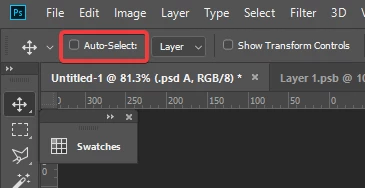
So, I've noticed that when I have layers selected and I want to use the move tool, lately, it unselects what I have selected and instead decides to move the top most level it can see. Whereas in the past, I could have multiple layers selected anywhere and then the tool would move those without trying to make its own selection. Result is that I can't move multiple layers unless I can click directly on them and there isn't any layer with pixels above them. Like, I'm unable to make a group with two items and move the group, because it wants to just select the layer I click to drag, and if I click elsewhere, it unselects the group.
Am I crazy remembering something incorrectly, or is there a fix for this?
 AdChoices